Restoring a Deleted Photo in iPhone Photos App
How to restore a previously deleted photo in my iPhone Photos app?
✍: FYIcenter.com
 You can restore a deleted photo in your iPhone Photos app
using these steps:
You can restore a deleted photo in your iPhone Photos app
using these steps:
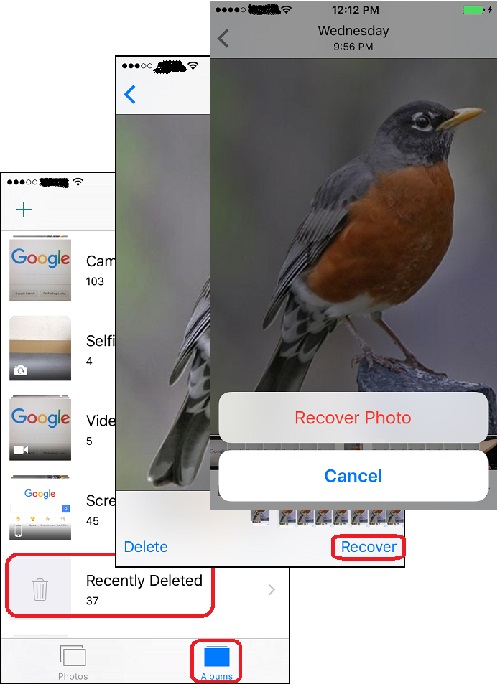
1. Open Photos app and tap on "Albums" near the bottom of the screen. You see your photos listed in different albums.
2. Tap on "Recently deleted" to open the camera roll. You see a list of photos deleted in the last 30 days.
3. Tap on the photo you want to restore. You see the full photo displayed on the screen.
4. Tap on "Recover" near the bottom right corner of the screen. You see the "Recover Photo" confirmation button displayed.
5. Tap on "Recover Photo" to confirm. This photo will be restored back to the "Camera Roll" album.
The picture below shows you how to restore a recently deleted photo the trash can in Photos app
on your iPhone:
⇒ Creating New Album in iPhone Photos App
2017-07-15, ∼2254🔥, 0💬
Related Topics:

