Transfer SIM Card to New iPhone
Can I transfer the SIM card from my old iPhone to my new iPhone?
✍: FYIcenter.com
 Yes. You can transfer the SIM card from your old iPhone to your new iPhone,
if they are using the same type of SIM cards.
Here are steps of how to transfer SIM card from old iPhone to new iPhone:
Yes. You can transfer the SIM card from your old iPhone to your new iPhone,
if they are using the same type of SIM cards.
Here are steps of how to transfer SIM card from old iPhone to new iPhone:
1. Power off the old iPhone.
2. Take out the SIM card from the old iPhone using a paper clip.
3. Power off the new iPhone.
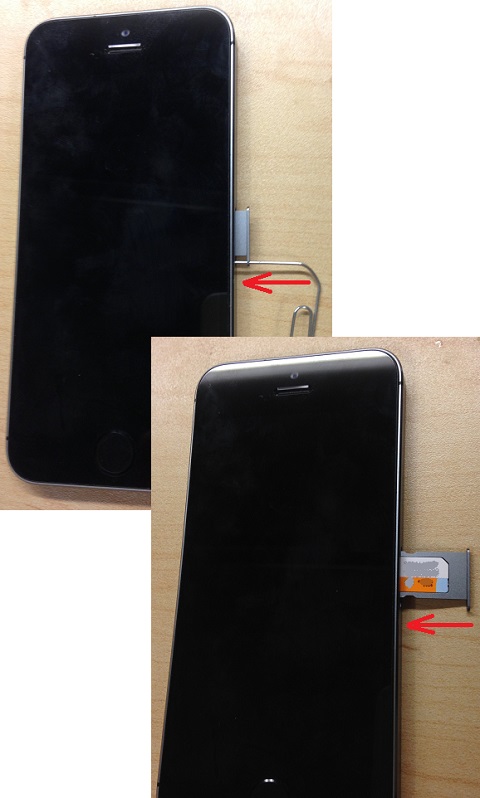
4. Take out the SIM card tray from the new iPhone using a paper clip.
5. Put the old SIM card to the new iPhone SIM card tray and push the tray back into the new iPhone.
6. Power on the new iPhone.
Your new iPhone should be getting the cellular service from your provider now.
The picture below shows you how to install a SIM card into an iPhone:
⇒ Transfer Personal Apps and Data to New iPhone
2021-03-07, ≈31🔥, 8💬
Related Topics:


💬 2023-04-01 Tilman Blakely: Neither I phone or I pad will allow m to make donations
💬 2023-02-27 Maria Tjimuhiva: I want to remove FaceTime and iMessage on iPhone desktop