Add New Contact in Phone App on iPhone
How to add new contacts and their phone numbers in Phone app on my iPhone? I want to keep track phone numbers of all my friends.
✍: FYIcenter.com
 The Phone app on your iPhone manages a contact phone number directory.
It allows you to store contact's name, multiple phone numbers, email address,
and other profile information.
The Phone app on your iPhone manages a contact phone number directory.
It allows you to store contact's name, multiple phone numbers, email address,
and other profile information.
Here are the correct steps to add a new contact with his/her phone number in Phone app on your iPhone.
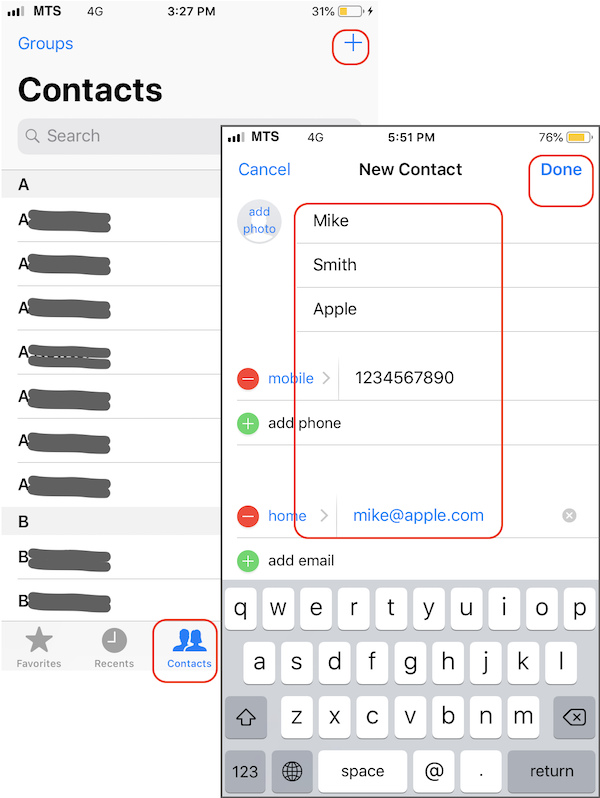
1. Open the Phone app: "Home > Phone". You see "Contacts" option listed at the bottom.
2. Tap on "Contacts". You see a list of contact names listed.
3. Tap on the "+" sign to add a new contact. Enter detailed information for the new contact into the form.
First Name: Mike
Last Name: Smith
Company: Apple (Mike works at Apple)
Mobile: 1234567890 (Mike has nice phone number)
Email: mike@apple.com
...
4. Tap on "Done" to save this new contact. You should see "Mike Smith" listed in the contact directory now.
If you want to call Mike again, you just go to "Phone > Contacts > Mike Smith" to pull out his phone number. Tap on the number to place the call. No need to remember the number and enter them on the keypad.
The picture below shows you how to add a new contact with his/her phone number in Phone app on your iPhone:
⇒ Create Contact from Phone Call History on iPhone
2020-04-30, ∼1985🔥, 0💬
Related Topics:

