View Books Library from iTunes on Windows
How to view my Books (used to be called iBooks) library on my iPhone from iTunes on my Windows computer?
✍: FYIcenter.com
 You can follow this tutorial to view Books (used to be called iBooks) library on you iPhone
from iTunes on your Windows computer.
You can follow this tutorial to view Books (used to be called iBooks) library on you iPhone
from iTunes on your Windows computer.
1. Run iTunes on your Windows computer.
2. Connect your iPhone to the computer with a USB cable. You see a phone icon showing up.
3. Click on the phone icon. You see the phone device management windows.
4. Click on "Books" under "On My Device" on the left. You see a list of books in your iTunes library on your iPhone.
The picture below shows you how to view Books library on you iPhone with iTunes:
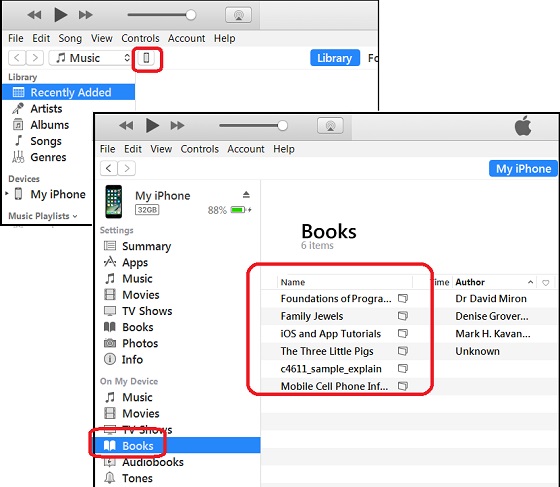
⇒ View iTunes Local Book Library on Windows
⇐ iTunes Media Folder Settings on Windows
2020-11-22, ∼2079🔥, 0💬
Related Topics:
