Check Battery Level on Apple AirPods
Q
How to check the battery level on my Apple AirPods?
✍: FYIcenter.com
A
 You can follow these steps to check the battery level on your Apple AirPods:
1. Make sure your Apple AirPods were setup properly with your iPhone as shown in an earlier tutorial
2. Open your iPhone and unlock the screen.
3. Put your AirPods back into the case. And hold the case near your phone..
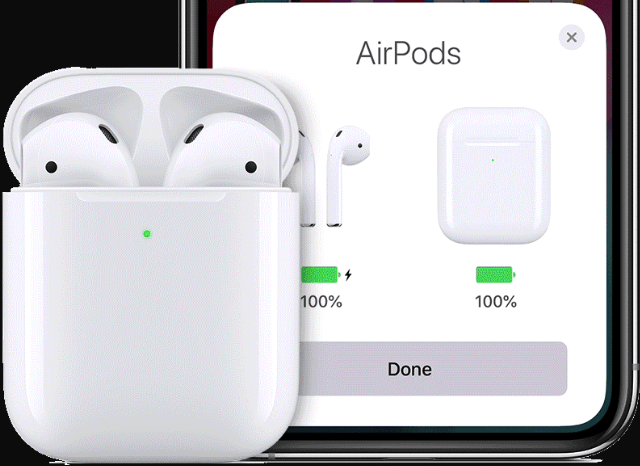
4. Open the case and wait for a couple of seconds for the AirPods status screen to show up on your iPhone. You should see 4 statuses:
- AirPods battery level as a percentage on the left.
- AirPods charging status as an icon next to the AirPods battery level.
- Case battery level as a percentage on the right.
- Case charging status as an icon next to the Case battery level.
5. Close the case to stop displaying AirPods statuses.
⇒ Audio/Sound Alerts on Apple AirPods
2020-12-02, ∼2479🔥, 0💬
Related Topics:

