Use Smart Switch on Mac Computer
How to Use Smart Switch on Mac Computers?
✍: FYIcenter.com
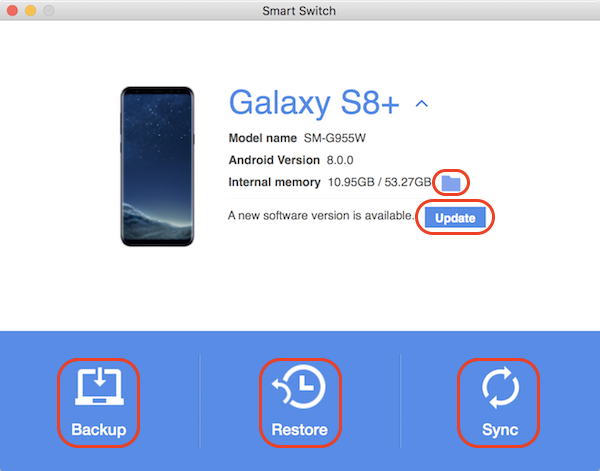
 Smart Switch on Mac computer offers 4 main functionalities
to manage your Galaxy phone.
Smart Switch on Mac computer offers 4 main functionalities
to manage your Galaxy phone.
- Backup - Creates a backup copy of personal data from your Galaxy phone to your Mac computer.
- Restore - Restores a backup copy of personal data from your Mac computer to your Galaxy phone.
- Sync - Synchronizes Contacts and Calendar of you Mac computer with your Galaxy phone.
- Update - Updates system software on your Galaxy phone.
- Files - Manages and moves files on your Galaxy phone.
Here are the steps to use Smart Switch on your Mac computer.
1. Install Smart Switch on your Mac computer and on your Galaxy phone.
2. Connect your Galaxy phone to your Mac computer with a USB cable.
3. Run Smart Switch on your Mac computer. You see a message asking you to unlock your Galaxy phone.
4. On your Galaxy phone, unlock the screen and click "ALLOW" to give permission for Smart Switch to access your phone.
5. On your Mac computer, Smart Switch displays your Galaxy phone as a connected device.
6. Click "Backup", "Restore", or "Sync" to start managing your Galaxy phone.
⇒ Smart Switch - Backup Phone Data
⇐ Install Smart Switch on Mac Computer
2023-01-30, ∼1692🔥, 0💬
Related Topics: