Set Up First Account in Samsung "Email"
Q
How to set up my first "Email" account on my Samsung phone? I want to access Yahoo email.
✍: FYIcenter.com
A
 Adding a Yahoo email account in Samsung "Email" is straightforward.
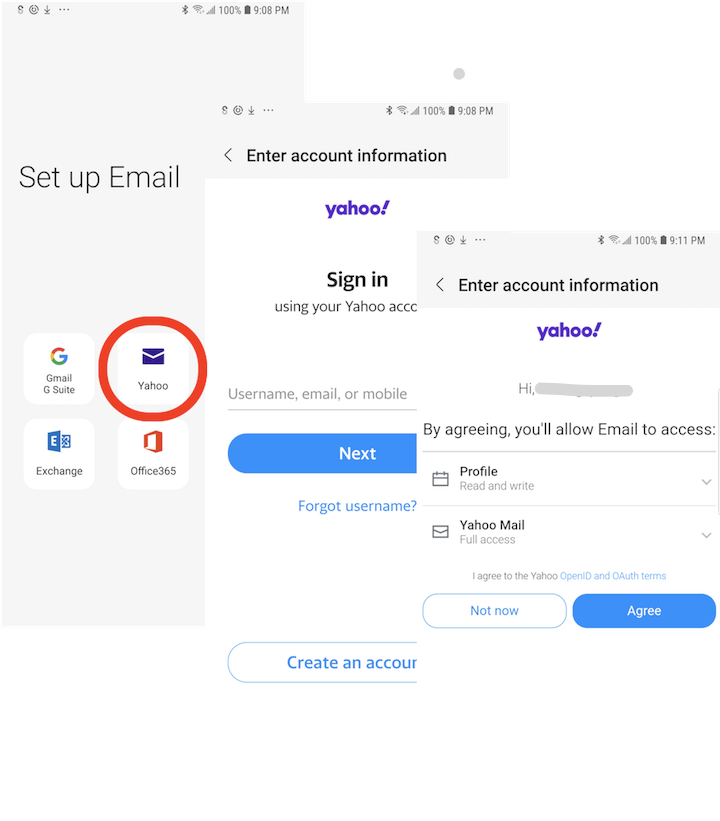
1. Tap on "Mail" app to open it. You see the "Set up Email" screen with popular email provider names listed.
2. Tap on "Yahoo". You see the Yahoo "Sign in" screen.
3. Enter your Yahoo user name, and tap "Next". You see the "Enter password" screen.
4. Enter your Yahoo password, and tap "Next". You see the access permission screen.
5. Tap "Agree". It will retrieve email messages from your Yahoo email inbox.
2022-08-26, ∼1999🔥, 0💬
Related Topics:

