Adding Multiple Accounts in Samsung "Email"
How to set up multiple "Email" accounts on my Samsung phone? I want to add my Gmail account.
✍: FYIcenter.com
 Adding more additional email accounts in Samsung "Email"
requires you to go through the "Email" menu.
Adding more additional email accounts in Samsung "Email"
requires you to go through the "Email" menu.
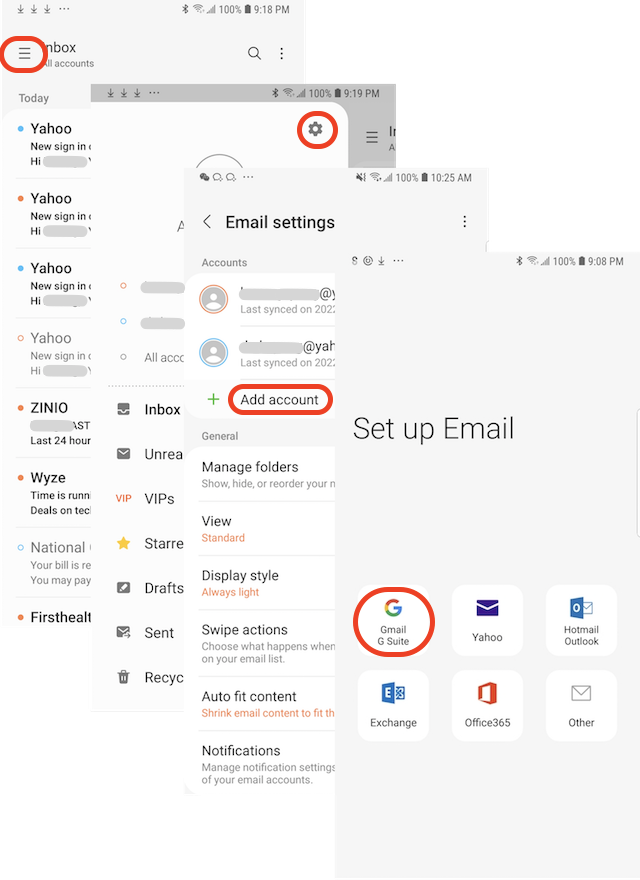
1. Tap on "Mail" app to open it. You see a list of email messages from existing email accounts.
2. Tap on Menu icon next to "Inbox". You see a list of your email accounts and associated email folders.
3. Tap on Settings icon near the top right corner. You see a list of your email accounts and associated settings.
4. Tap on "Add account". You see the "Set up Email" screen with popular email provider names listed.
5. Tap on "Gmail". You see the Gmail "Sign in" screen.
6. Follow Gmail instructions to finish adding your Gmail account.
7. When it's done, Gmail messages will be displayed together with email messages from your other email accounts.
⇒ Compose and Send Message in Samsung "Email"
2022-09-12, ∼2816🔥, 0💬
Related Topics:

