What Is iPhone Airplane Mode
What is iPhone airplane mode? What happens if I turn it on?
✍: Guest
 Airplane mode ensures your iPhone complies with airline regulations by
shutting off all wireless signals from the device when boarding a plane to
prevent interference.
Airplane mode ensures your iPhone complies with airline regulations by
shutting off all wireless signals from the device when boarding a plane to
prevent interference.
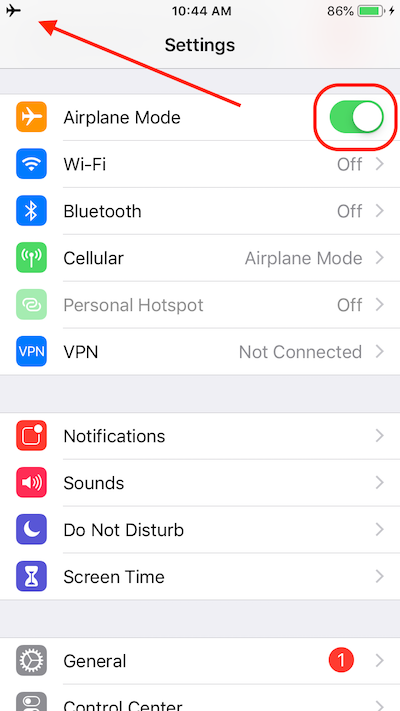
To turn on airplane mode, navigate to Settings -> Airplane Mode -> ON. This will prevent cellular phone calls and data, Wi-Fi, GPS and Bluetooth signals from being emitted from your iPhone. When activated, an airplane icon appears in the status bar of your iPhone home screen.
If needed, you can switch on Wi-Fi while in airplane mode. Bluetooth can also be switched on while in airplane mode, leaving the GPS and cellular radios off.
The picture below shows you "Settings > Airplane Mode" switch on your iPhone:
2016-06-30, ∼5796🔥, 0💬