iPhone Activation Error - No SIM Card
Why I am getting the "SIM Required" error while trying to activate my iPhone?
✍: FYIcenter.com
 If you are trying activate a new iPhone, or a deactivated old iPhone,
you will the "SIM Required" error if there is no SIM card inserted
in the iPhone.
If you are trying activate a new iPhone, or a deactivated old iPhone,
you will the "SIM Required" error if there is no SIM card inserted
in the iPhone.
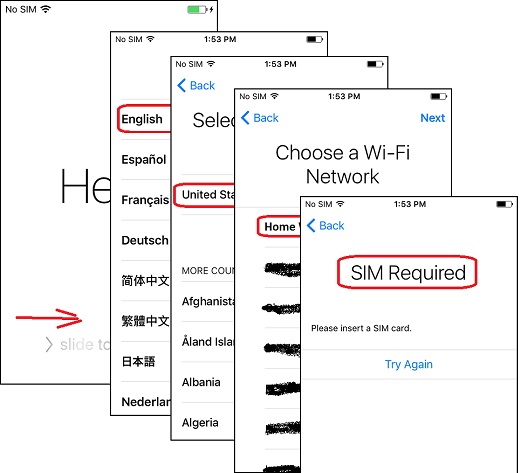
Here is a typical activation scenario:
1. Turn on your iPhone. You see the "Hello" screen.
2. Slide the screen to the right. You see the language selection screen.
3. Tap on "English". You see the "Select Your Country or Region" screen.
4. Tap on "United States". You see the list of Wi-Fi connections available in the area.
5. Tap on your own Wi-Fi and enter password for the Wi-Fi. You see a message saying "It may take a few minutes to activate your iPhone".
6. Wait for some time. You see the "SIM Required" screen with the message: "Please insert a SIM card".
So a valid SIM card is required to activate your iPhone. It is internally locked by the cell phone service provider. And you have to get a SIM card from them to unlock it.
The picture below shows you steps to activate an iPhone without a SIM card:
⇒ Different No SIM Card Errors on Apple iPhone
2020-12-24, ≈11🔥, 2💬
Related Topics:

