Reverting Edited Photos with iPhone Photos App
How to revert an edited photo back to the original with iPhone Photos app? I want undo changes I made on the edited photo.
✍: FYIcenter.com
 iPhone Photos app records changes you made on each edited photo and allows
your to revert back to the original photos any time you want to.
You can revert back to original photos
using these steps:
iPhone Photos app records changes you made on each edited photo and allows
your to revert back to the original photos any time you want to.
You can revert back to original photos
using these steps:
1. Open Photos app and tap on "Albums" near the bottom of the screen. You see your photos listed in different albums.
2. Tap on "Camera Roll" to open the camera roll. You see a list of photo previews displayed.
3. Tap the photo you have edited before. You see the modified photo displayed.
4. Tap "Edit" near the top right corner of the screen. You see some editing icons displayed. You also see an extra button near the bottom right corner of the screen: "Revert", because this photo have been edited.
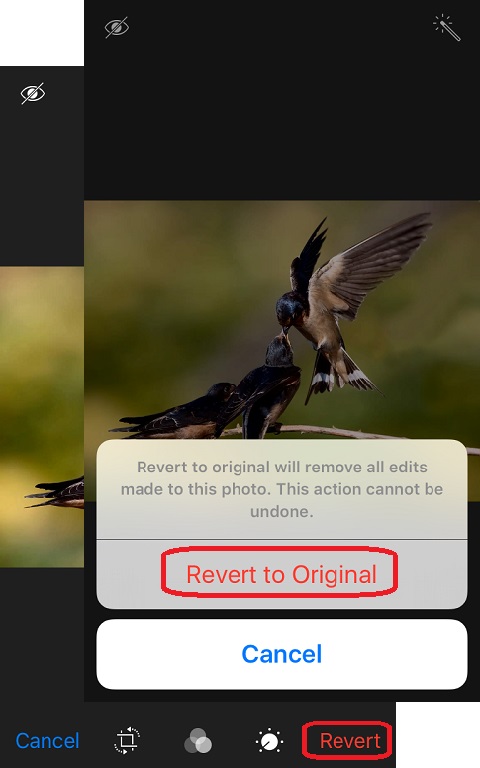
5. Tap on "Revert" near the bottom right corner of the screen. You see a warning message displayed:
Revert to original will remove all edits made to this photo.
This action cannot be undone.
6. Tap on "Revert to Original". You see original photo displayed..
The picture below shows you how to revert edited photos back to originals in Photos app
on your iPhone (source: birdnote.org):
⇒ Duplicating Photos with iPhone Photos App
⇐ Adjusting Photo Light and Color with iPhone Photos App
2021-02-10, ≈11🔥, 3💬
