Verify Photos Stored in iCloud Photo Library
How to verify if my iPhone photos are uploaded correctly or not in iCloud Photo Library?
✍: FYIcenter.com
 After you have turned on the "iCloud Photo Library" function on your iPhone,
photos you took on your iPhone should be automatically uploaded to the iCloud Photo Library.
After you have turned on the "iCloud Photo Library" function on your iPhone,
photos you took on your iPhone should be automatically uploaded to the iCloud Photo Library.
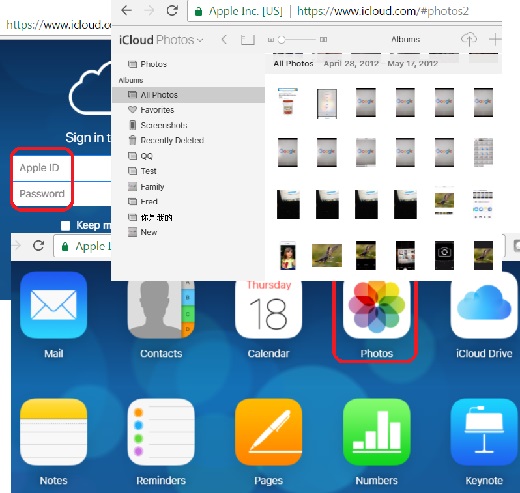
You can use the following steps to verify if your iPhone photos are uploaded correctly or not in iCloud Photo Library.
1. Go to a computer and run a Web browser.
2. Enter http://icloud.com Web site. You see the iCloud login page.
3. Enter your Apple ID and password. You see the iCloud home page. You may need to enter an Apple account verification code or a security question answer.
4. Click on Photos icon. You see your photos organized into albums in the same way as your iPhone.
5. Click "All Photos" album to open it. You see all your photos. Count them to ensure that the iCloud Photo Library matches your iPhone Photos app.
The picture below shows you how to verify photos Stored in iCloud Photo Library:
⇒ Don't Delete Photos Synchronized between iPhone and iCloud
⇐ Synchronize Photos on iPhone with iCloud Photo Library
2017-06-28, ∼6111🔥, 0💬
Related Topics:
