Managing iCloud Drive Files with iPhone
How to manage iCloud Drive files with my iPhone?
✍: FYIcenter.com
 Managing iCloud Drive files with iPhone can be done with the iCloud Drive app,
as described below:
Managing iCloud Drive files with iPhone can be done with the iCloud Drive app,
as described below:
1. Make sure iCloud Drive is turned on in the Settings.
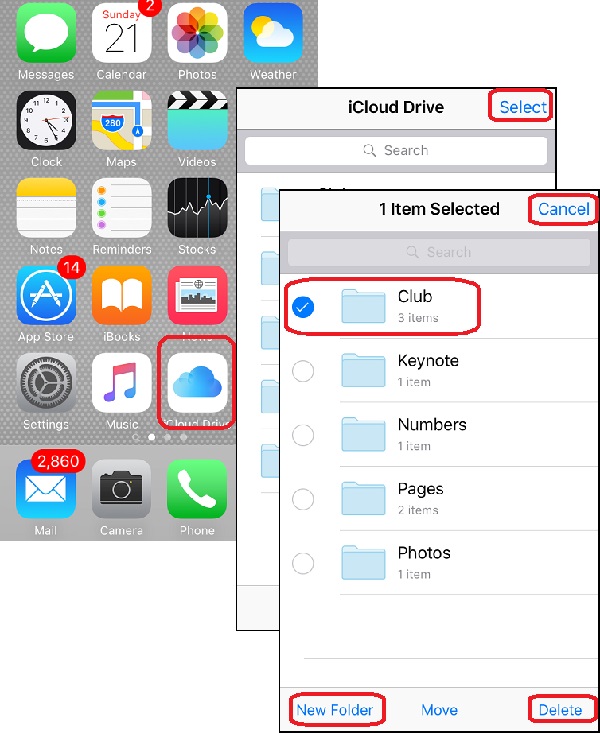
2. Tap on "iCloud Drive" app on the Home Screen, You see a list of iCloud Drive folders.
3. Tap on any folder to open it. You see the content of the folder.
4. Tap on "Select" near the top right corner of the screen. You see the content of the folder in select/edit mode.
5. Tap on "New Folder" near the bottom left corner of the screen to create a new sub folder.
6. Tap on any item, then "Delete" to delete the selected item. You need to confirm to delete, because the deleted file will be removed permanently from iCloud Drive.
The picture below shows you how to manage iCloud Drive files with your iPhone:
⇒ Apple iCloud - Frequently Asked Questions
2017-07-21, ∼3213🔥, 0💬
Related Topics:

💬 2021-10-10 FYIcenter.com: @Tim, What is the iOS version of your iPhone?
💬 2021-10-05 Tim: I can’t find updates in corner of App Store page

