Transfer Screenshots from LG Phone to Windows
How to Transfer Screenshots from LG Phone to my Windows computer?
✍: FYIcenter.com
 You can follow this tutorial to learn how to
Transfer Screenshots from LG Phone to my Windows computer:
You can follow this tutorial to learn how to
Transfer Screenshots from LG Phone to my Windows computer:
1. Connect your LG phone to your Windows computer with a USB cable.
2. Make sure the USB connection is set to file transfer mode as shown in the previous tutorial.
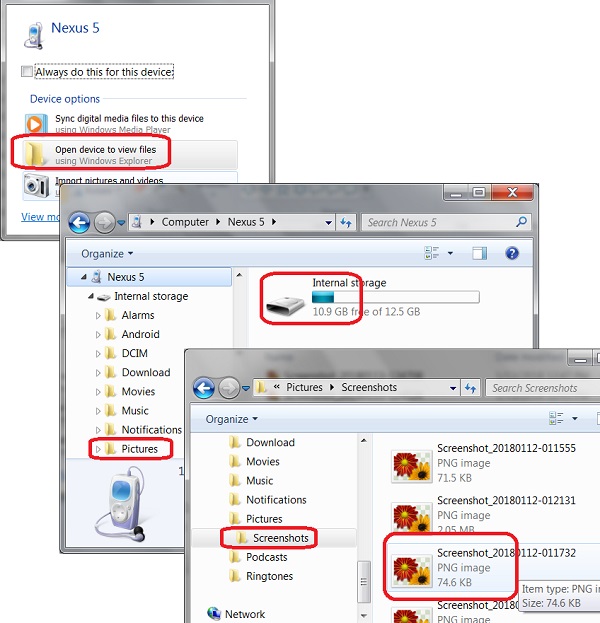
3. On your Windows computer, you see the AutoPlay interface:
4. Click "Open device to view files". You see the LG phone is connected as a disk drive.
5. Open the "Internal storage\Pictures\Screenshots" folder. You see all screenshots you have captured on your LG phone.
6. Copy and paste any screenshots you want to a new location on your Windows computer.
You can also delete screenshots on your LG phone with the "Delete" key.
The following picture shows you how to
Transfer Screenshots from LG Phone to my Windows computer:
⇒ Import Pictures from LG Phone to Windows
⇐ Windows AutoPlay for LG Phone USB Connection
2018-02-08, ∼3706🔥, 0💬

