Change Screen Lock on LG Phone
Q
How to Change Screen Lock on my LG Phone? I want to lock my phone.
✍: FYIcenter.com
A
 You can follow this tutorial to lock you LG phone
or change locking method.
You can follow this tutorial to lock you LG phone
or change locking method.
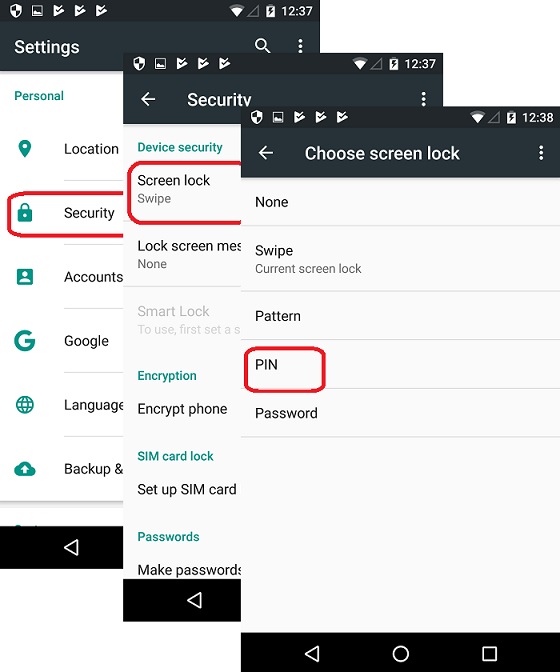
1. Go to "Settings > Security > Screen Lock". You see 4 methods of locking your phone.
None     - No lock and no swipe
Swipe    - Swipe to open your phone without lock code
Pattern  - Lock with pattern.
PIN      - Lock with 4 or more digits
Password - Lock with a password of letters and digits
2. Tap on "PIN".
3. Enter 4 or more digits as your screen lock PIN.
4. Close and re-open your phone.
5. Enter the PIN to unlock your phone.
The following picture shows you how to
Change Screen Lock on you LG Phone:
2018-04-21, ∼4332🔥, 0💬
Related Topics:

💬 2026-07-23 Alexis P: What is the imei number of this device
💬 2026-04-25 Byron P.: Nailed it... too groovy!