Receive AirDrop PDF File on macOS
How to receive AirDrop PDF books and other files on my macOS computer? My friend wants to send me some interesting PDF books.
✍: FYIcenter.com
 Here are the correct steps to receive AirDrop PDF books and other files on your macOS computer.
1. Turn on AirDrop on your macOS computer, in "Finder > AirDrop", and move closer to your friend.
2. Ask your friend to AirDrop the PDF book. You see the AirDrop alert message in two possible forms:
- Alert message box next to your device name, if the "AirDrop" window is open.
- Alert message box next to top-right corner of the screen, if the "AirDrop" window is closed.
3. Click "Accept" on the alert box to receive and save the incoming PDF book to the "Downloads" folder. There is no "Photos" option, if the incoming file is not a picture or video.
4. Open the PDF book from "Finder > Downloads" folder. Enjoy reading it.
Of course, click "Reject" on the alert box, if someone you don't know is trying to send you a file. It could be computer virus.
The picture below shows you how to receive AirDrop PDF fil from your friend to your macOS computer.
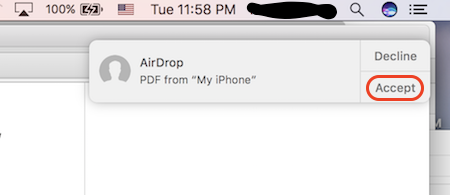
You can follow the above steps to receive any types of AirDrop files on your macOS computer.
⇒ AirDrop PDF File Out Off macOS
⇐ AirDrop PDF File Out Off iPhone
2020-06-08, ∼2358🔥, 0💬
Related Topics:

