View Personal Hotspot Connections on iPhone
How to view Personal Hotspot connections on my iPhone? I am running Personal Hotspot service and want to know how many devices are connected to my iPhone.
✍: FYIcenter.com
 Here are the correct steps to view Personal Hotspot connections on your iPhone.
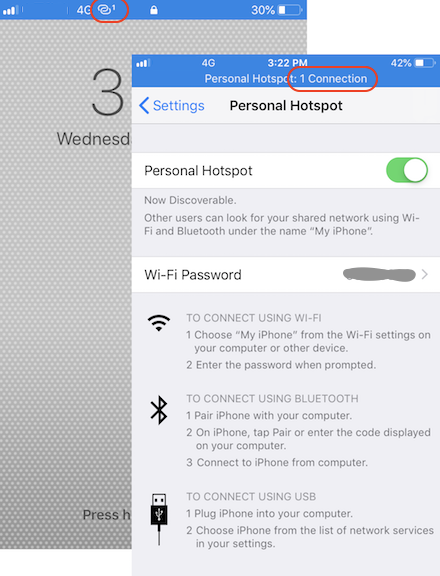
1. Turn on your iPhone. You should see the hotspot icon on top of the starting page. And the number of Personal Hotspot connections is displayed right next to the icon.
2. Go to "Settings > Personal Hotspot". You should see the screen title displaying "Personal Hotspot: n Connection(s)", where n is the number of other devices that are connected to your iPhone.
If the number of connections is higher than the number of known connected devices, then someone else is stealing your Internet connection. Turn off Personal Hotspot immediately and change the password for incoming Wi-Fi connections.
The picture below shows you how to view Personal Hotspot connections on iPhone.
⇐ Connect to Personal Hotspot with Bluetooth from macOS
2020-05-29, ∼2359🔥, 0💬
Related Topics: