View Wi-Fi Connection Details on iPhone
Q
How to view Wi-Fi connection details on my iPhone? I want to see what is the DNS (Domain Name Server) address for that connection.
✍: FYIcenter.com
A
 Here are the correct steps to view Wi-Fi connection details on my iPhone.
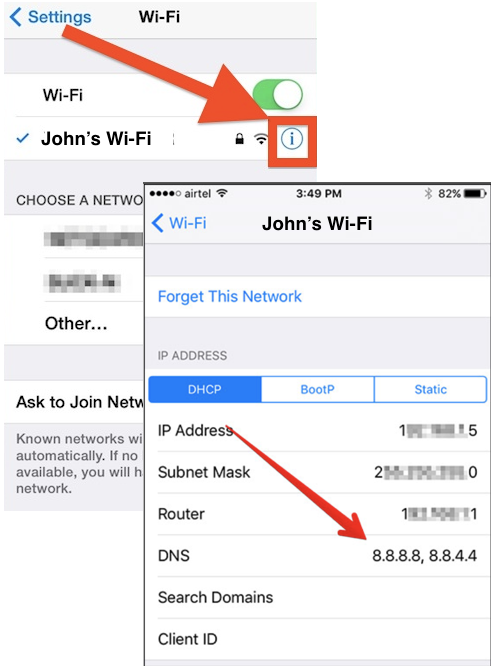
1. Go to "Settings > Wi-Fi". You see the Wi-Fi connection, which has the check sign displayed.
2. Tap on "info" icon at the end of the connection. You see your Wi-Fi connection details:
IP Address        192.168.1.5
Subnet Mask       255.255.255.0
Router            192.168.1.1
DNS               8.8.8.8, 8.8.8.4
Search Domains    google.com
Client ID         ...
Now you know the DNS (Domain Name Server) address is 8.8.8.8 or 8.8.8.4.
The picture below shows you how to turn on and off Wi-Fi on your iPhone:
⇒ Change Wi-Fi Network Settings on iPhone
2020-04-25, ∼2741🔥, 0💬
Related Topics:

