Turn On/Off Bluetooth on iPhone
Q
How to turn on and off Bluetooth function on my iPhone?
✍: FYIcenter.com
A
 Here are the correct steps to turn on Bluetooth function on your iPhone.
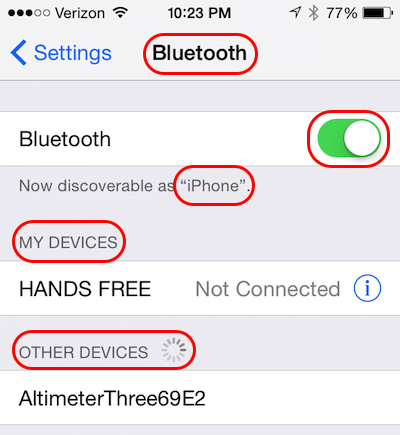
1. Go to "Settings > Bluetooth". You see the Bluetooth switch.
2. Turn the "Bluetooth" switch on. Your iPhone do the following:
- Make your iPhone available to other Bluetooth devices. You should see a message like, Now discoverable as "iPhone".
- Discover old Bluetooth devices you have used (paired) before. You should see a list under "MY DEVICES".
- Discover new Bluetooth devices you have never used (paired) before. You should see a list under "OTHER DEVICES".
The Bluetooth function is turned on now. You can start connecting to other Bluetooth devices. Or others can start connecting to your iPhone.
If you want to stop using the Bluetooth function, turn the "Bluetooth" switch off.
The picture below shows you how to turn on and off Bluetooth on your iPhone:
2020-04-14, ∼2929🔥, 0💬
Related Topics:

