Start iTunes for Windows First Time
How to start iTunes for Windows for the first time? I have installed it on my Windows computer.
✍: FYIcenter.com
 You can follow this tutorial to start iTunes for Windows.
1. Start Windows program search and enter "iTunes". You see "iTunes" listed in the search result.
2. Select "iTunes" from the search result list. You see the license agreement screen.
3. Click "Agree" to continue. You see the "Welcome" screen.
4. Click "No Thanks" for the question of "Do you agree to share details about library with Apple to see artist images, album covers, and other related information in your library?"
iTunes home screen is displayed and ready to use.
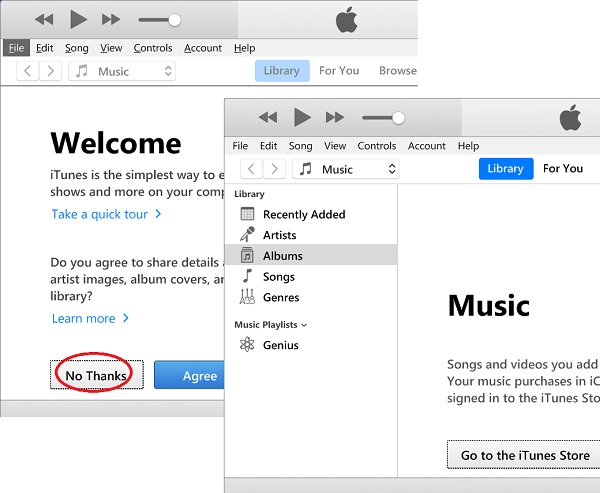
iTunes is ready to use on your Windows computer.
⇒ iTunes Video Playback Not Supported on Windows
⇐ Download and Install iTunes for Windows
2020-12-22, ∼2594🔥, 0💬
Related Topics:

