Check for iTunes Updates on Windows
Q
How to check for iTunes updates on Windows?
✍: FYIcenter.com
A
 If you installed iTunes more than a few months ago, your iTunes version
is probably outdated. You can following this tutorial to check for iTunes
updates.
If you installed iTunes more than a few months ago, your iTunes version
is probably outdated. You can following this tutorial to check for iTunes
updates.
1. Make sure your PC is connected to the Internet. And run iTunes.
2. Click "Help > Check for Updates" menu.
3. Wait for iTunes to contact Apple Website.
4. Read the message returned from iTunes. For example:
A new version of iTunes (12.9.3) is available.
Would you like to download it now?
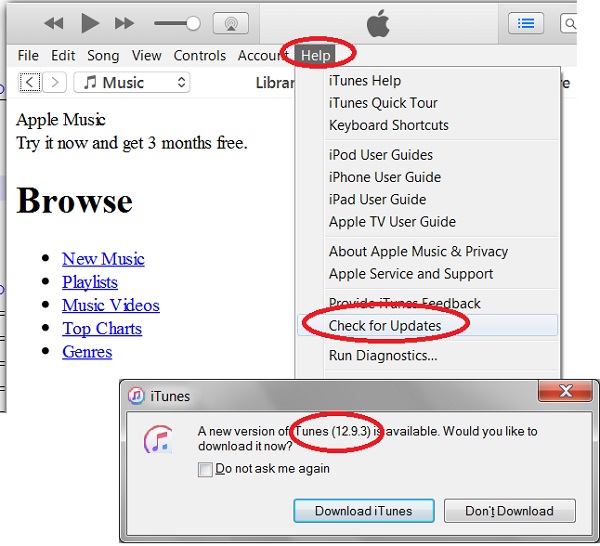
You should follow the next tutorial to download and upgrade iTunes on your PC.
⇒ Download and Install iTunes Update on Windows
⇐ iTunes Video Playback Not Supported on Windows
2020-12-22, ∼2382🔥, 0💬
Related Topics:
