Restore iPhone Backups from iTunes on Windows
How to restore an iPhone backup that was created earlier on iTunes for Windows? I accidentally deleted an important data on my iPhone.
✍: FYIcenter.com
 You can follow this tutorial to restore a backup created by iTunes for Windows to your iPhone.
Restoring an iPhone backup will bring back old data that you have deleted on your iPhone after the backup was created. But it will also wipe out new data that you have added to your iPhone after the backup was created.
You should not restore iPhone backups unless you have no other options.
1. Connect your iPhone to iTunes as shown in the previous tutorial.
2. Click on the smart phone icon in the menu area. You see the summary information about your iPhone.
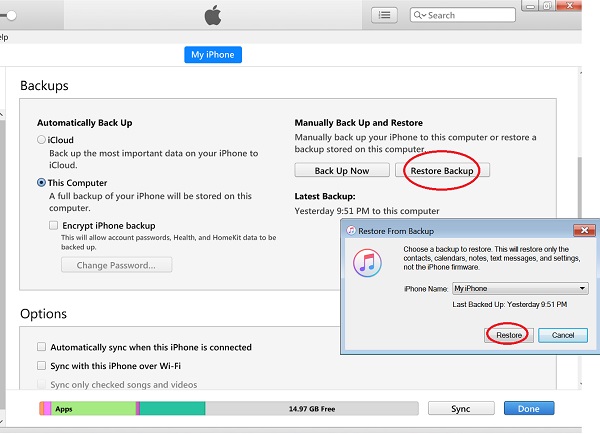
3. Click "Restore Backup" in the "Backups" section on the right side of the screen. You see a confirmation screen.
4. Click "Restore" after select which backup you want to restore.
5. Wait for iTunes to finish restoring the backup to your iPhone.
The picture below shows you how to restore iPhone backups from iTunes:
⇒ Manage iPhone Excel Files with iTunes on Windows
⇐ iPhone Backup File Location on Windows
2020-12-26, ∼2321🔥, 0💬
Related Topics:
