Apply iPhone iOS Update with iTunes on Mac
How to apply iOS update (upgrade) on my iPhone with iTunes on Mac? My iPhone is still running iOS 10.
✍: FYIcenter.com
 You can follow this tutorial to apply iOS upgrade to your iPhone with iTunes.
Warning: If you are using an old iPhone, upgrading to a new version of iOS may cause your iPhone to run slower. And it may also cause functionality issues. This is because old hardware in your iPhone may not support well the new iOS version.
1. Connect your iPhone to iTunes as shown in the previous tutorial. Make sure that iTunes is connected to the Internet.
2. Click on the smart phone icon in the menu area. You see the summary information about your iPhone.
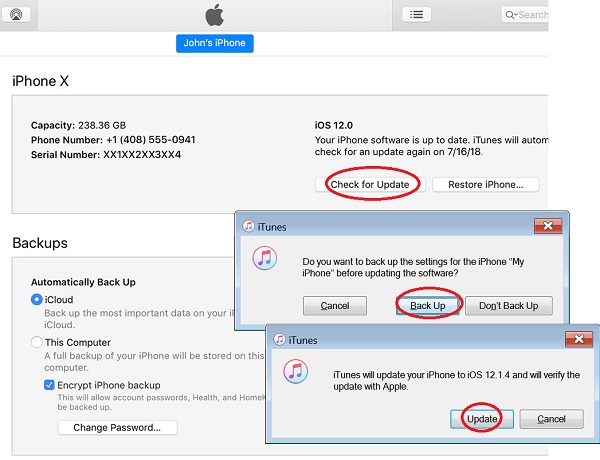
3. Click "Check for Update" in the "summary" section on the right side of the screen. You see the backup suggestion message, if you an update is available,
Do you want to back up the settings for the iPhone
before updating the software?
4. Click "Backup" to let iTunes to backup iPhone settings. You see the update warning message.
iTunes will update your iPhone to iOS 12.1.4 and will verify
the update with Apple.
5. Click "Update" to finish updating the iOS.
⇒ iPhone Factory Settings with iTunes on Mac
⇐ iTunes Functions on Mac to Manage iPhone
2020-11-11, ∼2279🔥, 0💬
Related Topics:
