iPhone Factory Settings with iTunes on Mac
How to restore my iPhone to Factory Settings with iTunes on Mac? My iPhone is not working properly after the upgrade.
✍: FYIcenter.com
 You can follow this tutorial to restore your iPhone to factory
settings and the latest iOS version.
This may resolve issues caused by configuration changes made by yourself.
You can follow this tutorial to restore your iPhone to factory
settings and the latest iOS version.
This may resolve issues caused by configuration changes made by yourself.
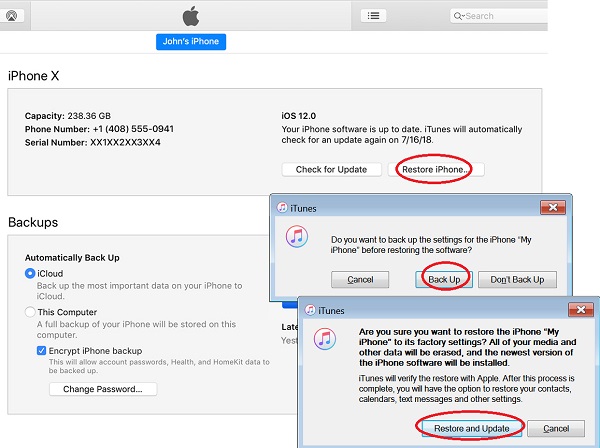
1. Connect your iPhone to iTunes as shown in the previous tutorial. Make sure that iTunes is connected to the Internet.
2. Click on the smart phone icon in the menu area. You see the summary information about your iPhone.
3. Click "Restore iPhone" in the "summary" section on the right side of the screen. You see the backup suggestion message, if you an update is available,
Do you want to back up the settings for the iPhone
before restoring the software?
4. Click "Backup" to let iTunes to backup iPhone settings. You see the restore warning message.
Are you sure yo want to restore the iPhone to its
factory settings? All of your media and other data
will be erased, and the newest version of the iPhone
software will be installed.

iTunes will verify the restore with Apple, After the
process is complete, you will have the option to restore
contacts, calendars, text messages and other settings.
5. Click "Restore and Update" to finish the process.
⇒ Back Up iPhone with iTunes on Mac
⇐ Apply iPhone iOS Update with iTunes on Mac
2020-10-26, ∼2334🔥, 0💬
Related Topics:
