What Is Samsung "My Files"
What Is "My Files" App on my Samsung phone?
✍: FYIcenter.com
 "My Files" on you Samsung phone is an app that comes with your phone.
It allows you to manage all the files on your smartphone, just like
a file explorer on your computer.
"My Files" on you Samsung phone is an app that comes with your phone.
It allows you to manage all the files on your smartphone, just like
a file explorer on your computer.
You can also use "My Files" to manage files stored on SD cards, USB drives and files in the cloud storage connected with your smartphone at the same time.
You can find "My Files" by searching "file" on the Apps screen.
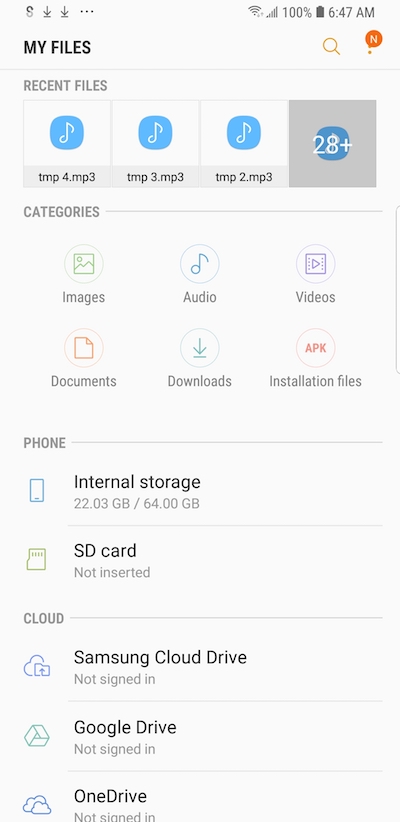
Once "My Files" is open, you see the file manager screen with the following sections and access entries.
1. RECENT FILES - A list of files you have downloaded or opened recently.
2. CATEGORIES - Access entries to files based on file types.
- Images - Photos, screenshots and other image files.
- Audio - Music and other audio files.
- Videos - Video files.
- Documents - PDF files.
- Downloads - Downloaded files.
- Installation files - Android installation page (*.apk) files.
3. PHONE - Files stored on the phone.
- Internal storage - Files stored in phone's built-in storage.
- SD card - Files stored in the SD card, if you inserted one.
4. CLOUD - Files stored in the cloud provided by service providers. Most of them are free.
- Samsung Cloud Drive - Cloud storage provided by Samsung.
- Google Drive - Cloud storage provided by Google.
- OneDrive - Cloud storage provided by Microsoft.
⇐ Using Samsung "My Files" App
2022-10-07, ∼3070🔥, 0💬
Related Topics:

💬 2025-09-20 FYIcenter.com: @Mike, We will add it later.
💬 2025-09-17 Mike Cahill: Why on earth is there no check mark icon in the text section?

