Keep "My Files" App Updated
How to keep "My Files" app up to date?
✍: FYIcenter.com
 "My Files" is an app developed by Samsung and pre-installed
on your Samsung phone. You don't need to do any installation
to use it.
"My Files" is an app developed by Samsung and pre-installed
on your Samsung phone. You don't need to do any installation
to use it.
But you need to check and download newer versions from app stores to keep it up to date.
1. Go to "Galaxy Store" and search on "My Files". You will find "Samsung My Files".
2. Tap on "Update", if a newer version is available. It will download and install the newer version for you.
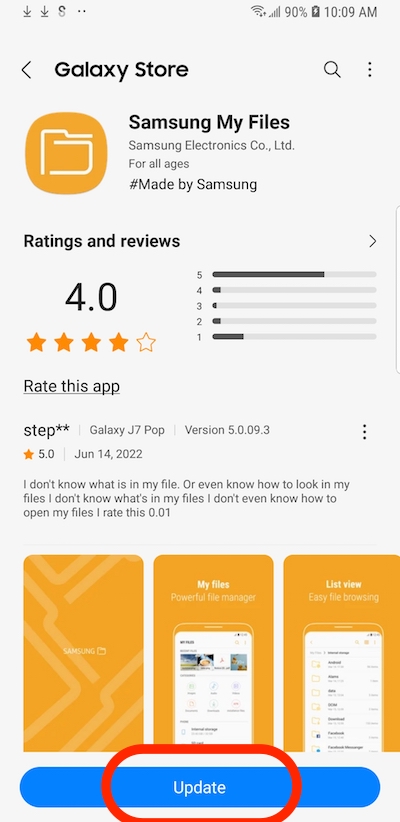
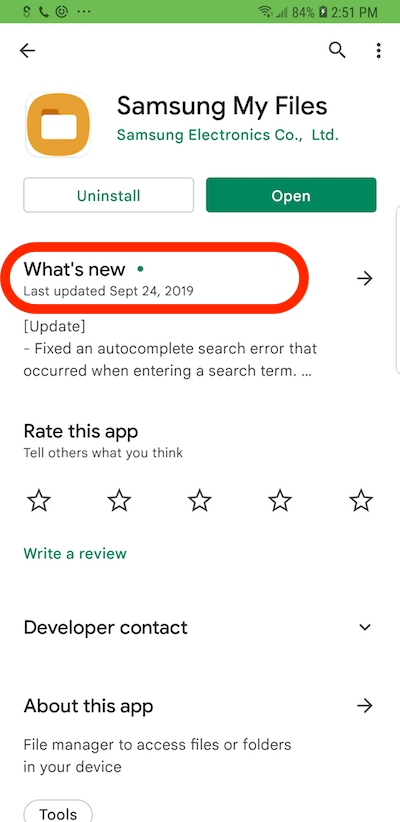
Do not use to "Play Store" to update "My Files". The version in "Play Store" is always older than "Galaxy Store". For example, the latest version in "Play Store" is Sep. 24, 2019, in 2022.
⇒ File Folders on Internal Storage
2022-10-07, ∼2220🔥, 0💬
Related Topics:

💬 2025-09-20 FYIcenter.com: @Mike, We will add it later.
💬 2025-09-17 Mike Cahill: Why on earth is there no check mark icon in the text section?

