Smart Switch - Manage Files on Phone
Can I manage files on my Samsung phone from my computer using Smart Switch?
✍: FYIcenter.com
 Yes, you can use Smart Switch on your computer to manage files on your phone
as shown in these steps.
Yes, you can use Smart Switch on your computer to manage files on your phone
as shown in these steps.
1. Make sure Smart Switch is installed on your Mac computer and on your Samsung phone.
2. Connect your Galaxy phone to your computer with a USB cable.
3. Run Smart Switch on your computer. You see a message asking you to unlock your Galaxy phone.
4. On your Galaxy phone, unlock the screen and click "ALLOW" to give permission for Smart Switch to access your phone.
5. On your computer, Smart Switch displays your Galaxy phone as a connected device.
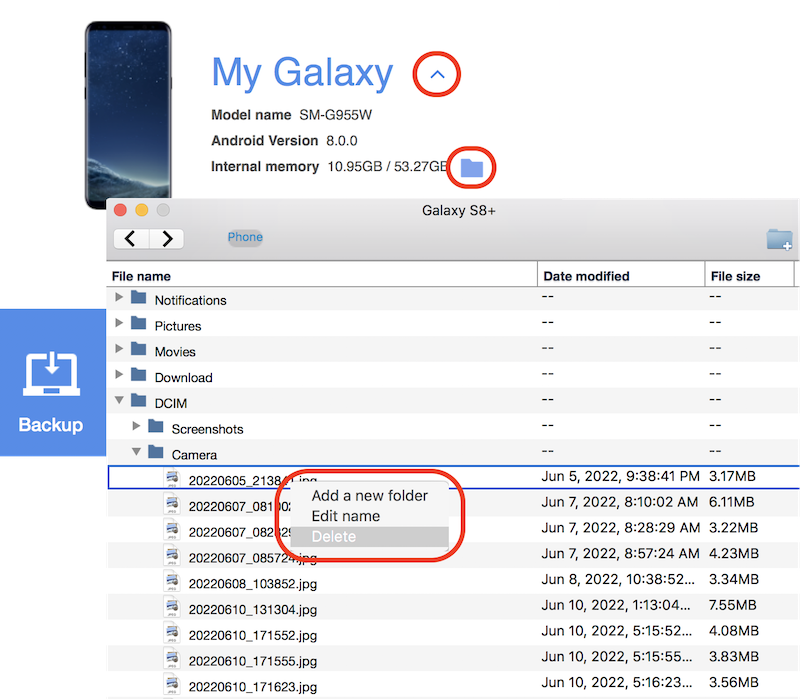
6. Click the down arrow next to your phone name. You see a quick summary your phone: model name, version, and memory size.
7. Click the file folder icon next to the memory size. You see a file manager window displayed.
8. Browse and select any file on your phone. And right-mouse click to open the context menu.
9. Click "Add a new folder/Edit name/Delete" from the context menu to manage the selected file.
⇒ Smart Switch - Transfer Photo Files from Phone
⇐ Smart Switch - Delete Backup Files
2023-02-28, ∼2472🔥, 0💬
Related Topics:

