Smart Switch - Transfer Music Files to Phone
How to transfer music or other files from my computer to my Samsung Galaxy phone with Smart Switch?
✍: FYIcenter.com
 Transfer music, video, photo, or document files, from your computer to you Samsung Galaxy phone
to your computer with Smart Switch is easy.
You can just follow these steps.
Transfer music, video, photo, or document files, from your computer to you Samsung Galaxy phone
to your computer with Smart Switch is easy.
You can just follow these steps.
1. Connect your Galaxy phone to your computer with a USB cable. And start Smart Switch on your computer as shown in the last tutorial. You see your Galaxy phone displayed as a connected device.
2. Click the down arrow next to your phone name. You see a quick summary your phone: model name, version, and memory size.
3. Click the file folder icon next to the memory size. You see a device file manager window displaying your phone files.
4. Browse and open the "Music" folder or other folder as the destination folder on the phone.
5. Open a computer file manager (File Explorer or Finder) to display files on the computer.
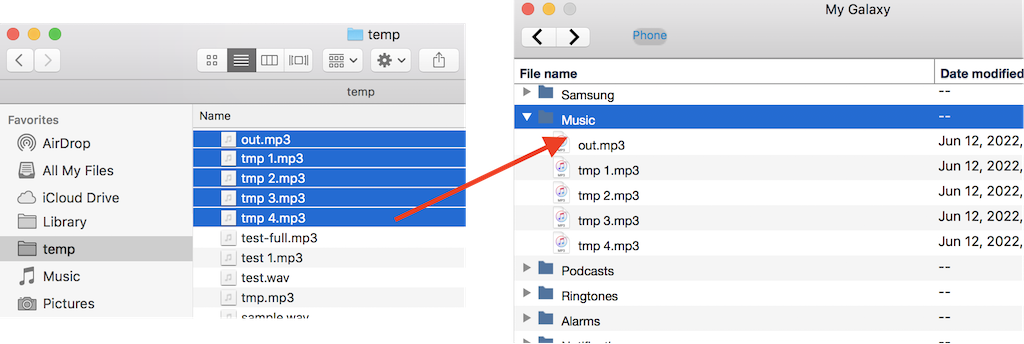
5. Select and drag any computer files from the computer file manager to the device file manager. You see files transferred from your computer to your phone.
⇒ Smart Switch - Restore Backups from iPhone
⇐ Smart Switch - Transfer Photo Files from Phone
2022-09-29, ∼2272🔥, 1💬
Related Topics:

