Find Downloaded Email Attachments in "Files"
Where are my downloaded email attachments stored on my Samsung phone? I want to "Files" to find them.
✍: FYIcenter.com
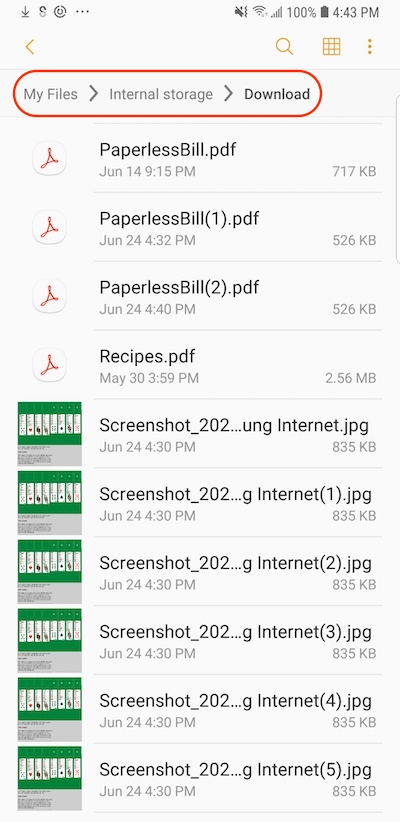
 Attachment files downloaded from emails are stored
in the "Download" folder in the "Internal storage" on your phone.
Attachment files downloaded from emails are stored
in the "Download" folder in the "Internal storage" on your phone.
If you have downloaded email attachments long time ago, you can find them on your phone using the "Files" app.
1. Tap on "Files" app to open it. You see a list of recently downloaded attachments, and entry points to files stores on phone.
2. Tap on the search icon and a keyword to search attachments. You may find them quickly.
3. If you can not them by keywords, tap on "Internal storage > Download" folder. You a list downloaded attachment files sorted by their names.
4. Scroll down. You will find the attachment file you are looking for.
Also notice that multiple copies are saved, if you tap "Save" on an attachment more than once in the email.
⇒ Save Message as File in Samsung "Email"
2023-02-28, ∼2620🔥, 0💬
Related Topics:

