Home Screen on Samsung Galaxy Tablet
How to organize home screen on Samsung Galaxy Tablet?
✍: FYIcenter.com
 Home screen on Samsung Galaxy Tablet is the first screen that opens
when you unlock your tablet.
So you should put the most frequently used apps on the home screen.
Home screen on Samsung Galaxy Tablet is the first screen that opens
when you unlock your tablet.
So you should put the most frequently used apps on the home screen.
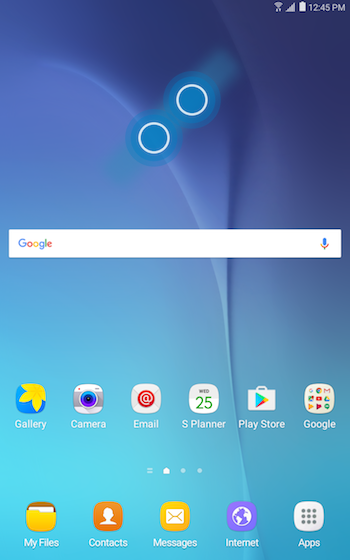
Here are the elements on home screen.
1. Status icons displayed near the top edge.
2. Local weather and time displayed in the top-right area.
3. Google search widget displayed in the middle of the lower part.
4. Frequently used app links displayed in remaining empty area.
5. 3 quick action icons: Apps, Home, Back near the bottom edge.
You press and hold on any element to remove or move its location.
⇒ Apps Screen on Samsung Galaxy Tablet
⇐ Buttons/Ports/Sensors on Samsung Tablet
2023-02-03, ∼3194🔥, 0💬
Related Topics:

