Download Older Apps on APKMirror
How to download and install older apps from APKMirror?
✍: FYIcenter.com
 Downloading and installing older apps from APKMirror is easy.
1. Open APKMirror in Chrome Web browser.
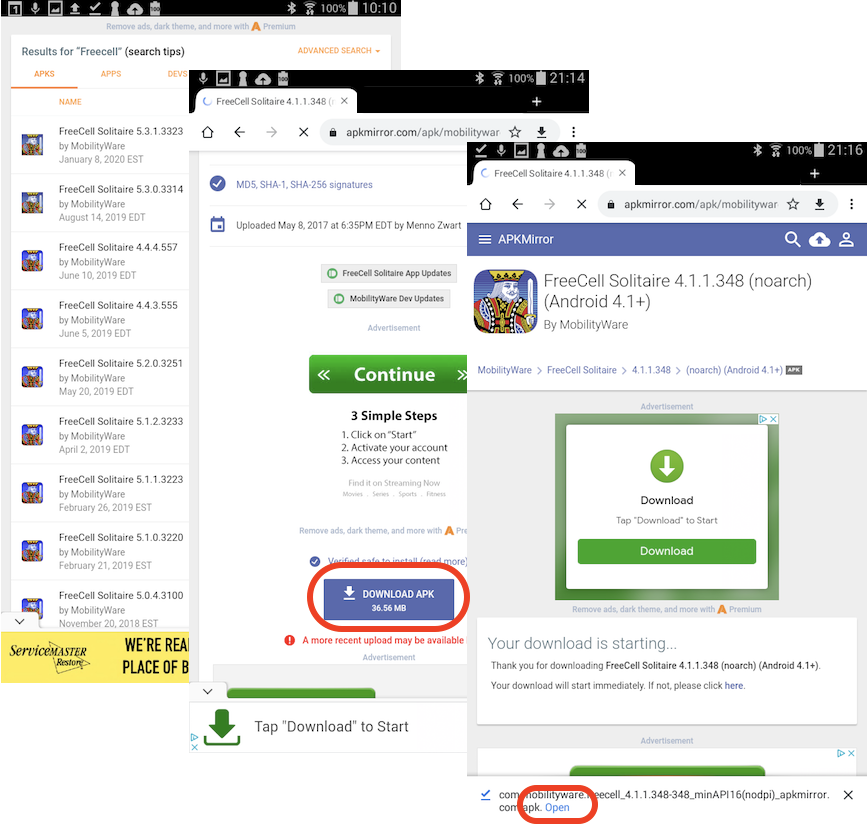
2. Search for "Freecell" and select "MobilityWare". You see a list of different versions of "≈" from "MobilityWare".
3. Go to the end of the list and select the "4.1.1" version. You see details about the "MobilityWare 4.1.1" APK file. Tap on "DOWNLOAD APK" button.
4. Wait for the APK file to be downloaded. You see the download file name and "open" link at the bottom of the screen.
5. Tap on "open" link to install it. You may see a security warning:
For security reasons, your device is currently set to block
installation of applications not obtained from Play Store.
To change this, go to Settings > Security > Unknown source.
6. Tap on "Settings". And turn on "Allow installation of applications from both trusted and unknown sources" for this installation only.
7. Finish the installation and enjoy the game.
2022-12-23, ∼1592🔥, 0💬
Related Topics:


