Wireless Debugging Connection for Motorola Phone
How to use Wi-Fi Wireless Debugging connection from Motorola phone to computer?
✍: FYIcenter.com
 The Wireless Debugging feature allows you to troubleshot issues on
your Motorola phone over the Wi-Fi wireless connection:
The Wireless Debugging feature allows you to troubleshot issues on
your Motorola phone over the Wi-Fi wireless connection:
- Inspecting log files on your phone.
- Transferring files from and to your phone.
- Installing custom apps on your phone.
- Running Android system commands on your phone.
You can follow these steps to use USB Debugging.
1. Install Android SDK Platform Tools on your computer.
2. Connect your computer and phone to the same Wi-Fi wireless network.
3. Turn on "Developer Options" on your phone as shown in the previous tutorial.
4. Go to "Settings > System > Developer Options".
5. Turn on "Wireless debugging". You see the following warning message:
Allow wireless debugging on this network?

Network Name (SSID): "************"
Wi-Fi Address (BSSID): ************
[x] Always allow on this network

[Cancel] [Allow]
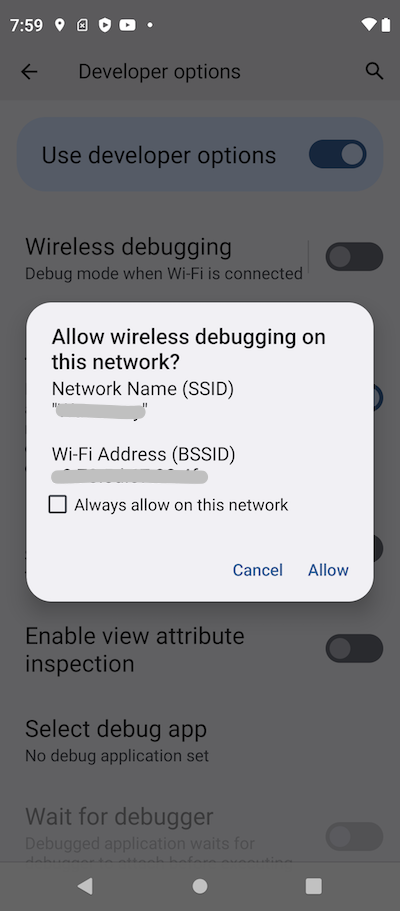
7. Tap "Allow" to authorize the connection.
8. Tap "Wireless debugging" to see connection settings.
9. Tap "Pair device with pairing code". You see the IP address, port number and paring code.
Pair with device

Wi-Fi paring code: 205698
IP address & port: 10.0.0.100:38715
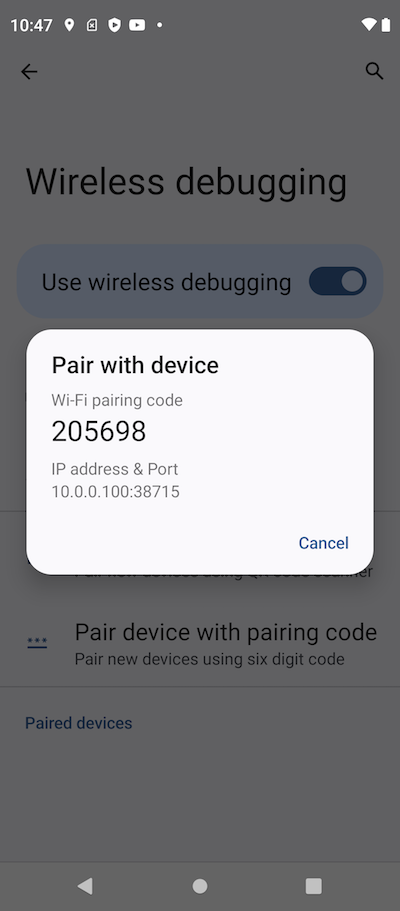
10. Go back to your computer. And run the "adb pair" command provided by "Android SDK Platform Tools".
fyicenter> adb pair 10.0.0.100:38715

Enter pairing code: 205698
Successfully paired to 10.0.0.100:38715 [guid=adb-ZY22GWX96K-vuWq1l]
11. Check the connection and run a debug command.
fyicenter: adb devices

List of devices attached
adb-ZY22GWX96K-vuWq1l._adb-tls-connect._tcp.  device

fyicenter> adb shell ps
USER           PID  PPID     VSZ    RSS WCHAN            ADDR S NAME
root             1     0 2352016   5104 0                   0 S init
root             2     0       0      0 0                   0 S [kthreadd]
root             3     2       0      0 0                   0 I [rcu_gp]
root             4     2       0      0 0                   0 I [rcu_par_gp]
root             8     2       0      0 0                   0 I [mm_percpu_wq]
root             9     2       0      0 0                   0 S [ksoftirqd/0]
root            10     2       0      0 0                   0 I [rcu_preempt]
root            11     2       0      0 0                   0 I [rcu_sched]
...
⇒ Background Services on Motorola Phone
⇐ USB Debugging Connection for Motorola Phone
2023-07-08, ∼8953🔥, 0💬
Related Topics: