iPad Buttons/Switches and Meanings
Q
What do those buttons and switches mean on my iPad?
✍: FYIcenter.com
A
 Your iPad has several buttons and switches located at different
places on your iPad.
Your iPad has several buttons and switches located at different
places on your iPad.
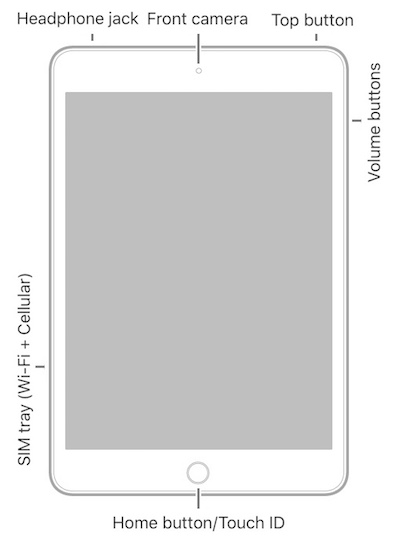
Home/Touch ID Button - Located at the bottom center of the screen and allowing you to:
- Press once to wake up the iPad.
- Press once to get out of an app and go back to Home screen.
- Press twice to see App Switcher.
- Touch and hold to unlock the iPad with your fingerprint.
- Press it together with the power button to take screenshot.
Power Button (also called Sleep/Wake button, or Side button, or Top button) - Located on the top side or on the right side and allowing you to:
- Press once to wake up the iPad.
- Press once to put the iPad to sleep.
- Press and hold to power on the iPad.
- Press and hold to power off the iPad.
- Press it together with the home button to take screenshot.
Volume Up Button - Located on the left side and allowing you to:
- Press once to bring the speaker's volume up by 1 scale.
- Press once to release camera shutter to take a picture.
Volume Down Button - Located on the left side and allowing you to:
- Press once to bring the speaker's volume down by 1 scale.
- Press once to release camera shutter to take a picture.
The picture below shows you locations of iPad buttons and switches:
2025-07-04, ∼4919🔥, 0💬
Related Topics:


