Transferring Music from Computer to iPhone
How to transfer music files to my iPhone from my Windows computer? I have some nice music on my computer and I want to listen them on my iPhone.
✍: FYIcenter.com

The easiest way to transfer music files from your Windows computer to your iPhone is to use iTunes:
1. Run iTunes on your computer.
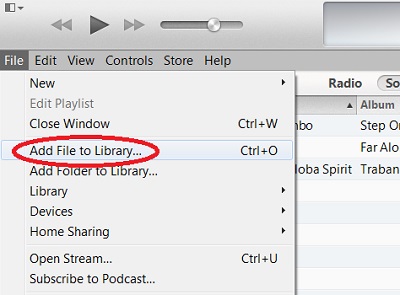
2. Add music files or folders to iTunes library using "File > Add File to Library..." menu.
3. Connect your computer to your iPhone with the USB cable.
4. Click "iPhone" tab. iTunes displays the iPhone device view.
5. Click "Music" tab. iTunes shows the music sync page.
6. Check "Sync Music" and "Entire music library".
7. Click the "Sync" button at the end of the status bar. iTunes syncs your music files on computer with your iPhone.
8. Go to your iPhone and tab on "Music > Songs". You will see new music items from your computer showing up.
Tap on a music trac name to play.
2014-06-20, ∼3480🔥, 0💬
Related Topics: