Categories:
Android (32)
Apple (iPhone) (829)
Apps (26)
BlackBerry (3)
General (438)
HTC (6)
Huawei (83)
LG (43)
Motorola (50)
Nokia (4)
Palm (10)
Samsung (139)
Sony (1)
Technology (17)
Windows Phone (209)
ZTE (5)
Online Tools:
Tutorial Collections:
Other Resources:
Scan for a Wi-Fi Network
How to scan for a Wi-Fi Network on my Android phone?
✍: Guest
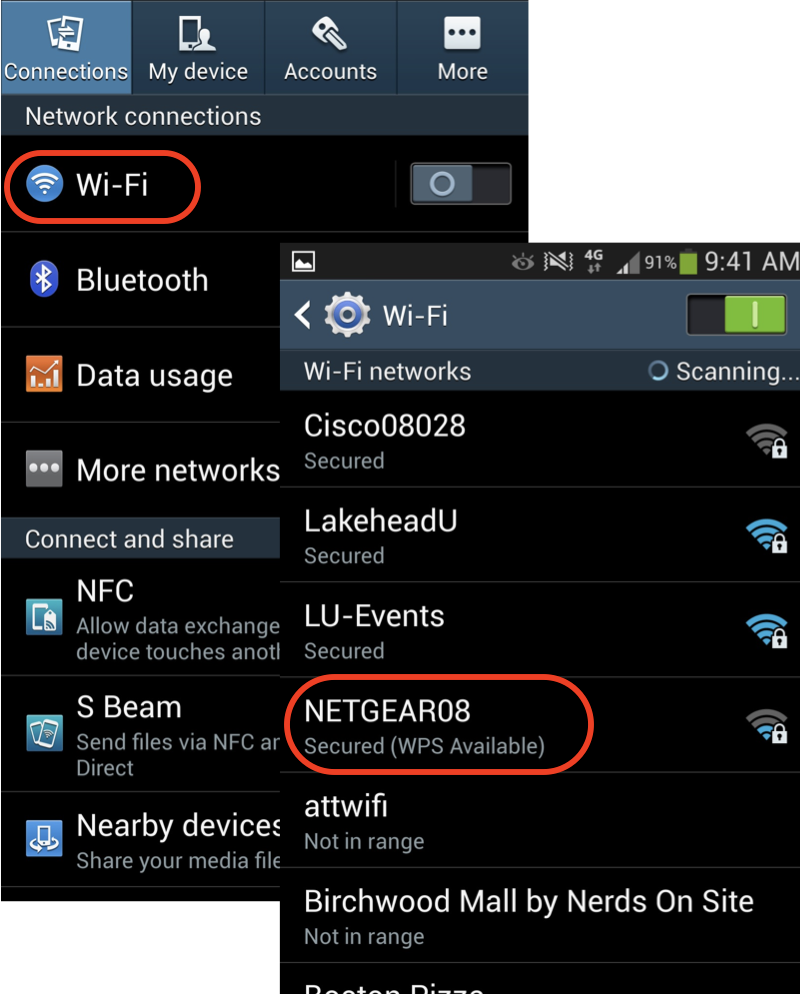
1. Tap "Settings" on the home screen.
2. Tap "Wireless & networks", you see a list of network related settings.
3. Look for the Wi-Fi option. In many cases, there will be a switch here to toggle Wi-Fi on and off. If not, tap the Wi-Fi option first and then turn Wi-Fi on.
4. Your phone will automatically scan for available Wi-Fi networks within range, and display them with their SSIDs.
5. Tap on a SSID to see detailed information.
⇒ Select and Join a Wi-Fi Network
⇐ Find the Wi-Fi Network SSID and Password
2013-06-27, ∼5173🔥, 0💬
Popular Posts:
What are background services created by System UI? Can I stop them to improve performance of my Moto...
How to Check Wi-Fi Connection Strength and Details on Android? Any time your phone has an open Wi-Fi...
What is the SEID on my phone? SEID (Security Element Identifier) is a long identifier of the Securit...
Where to find answers to frequently asked questions about SIM (Subscriber Identity Module) Card? Her...
Where to find answers to Samsung phone related issues? Here is a list of Samsung phone related issue...