Categories:
Android (32)
Apple (iPhone) (829)
Apps (26)
BlackBerry (3)
General (438)
HTC (6)
Huawei (83)
LG (43)
Motorola (50)
Nokia (4)
Palm (10)
Samsung (148)
Sony (1)
Technology (17)
Windows Phone (209)
ZTE (5)
Online Tools:
Tutorial Collections:
Other Resources:
Scan for a Wi-Fi Network
How to scan for a Wi-Fi Network on my Android phone?
✍: Guest
1. Tap "Settings" on the home screen.
2. Tap "Wireless & networks", you see a list of network related settings.
3. Look for the Wi-Fi option. In many cases, there will be a switch here to toggle Wi-Fi on and off. If not, tap the Wi-Fi option first and then turn Wi-Fi on.
4. Your phone will automatically scan for available Wi-Fi networks within range, and display them with their SSIDs.
5. Tap on a SSID to see detailed information.
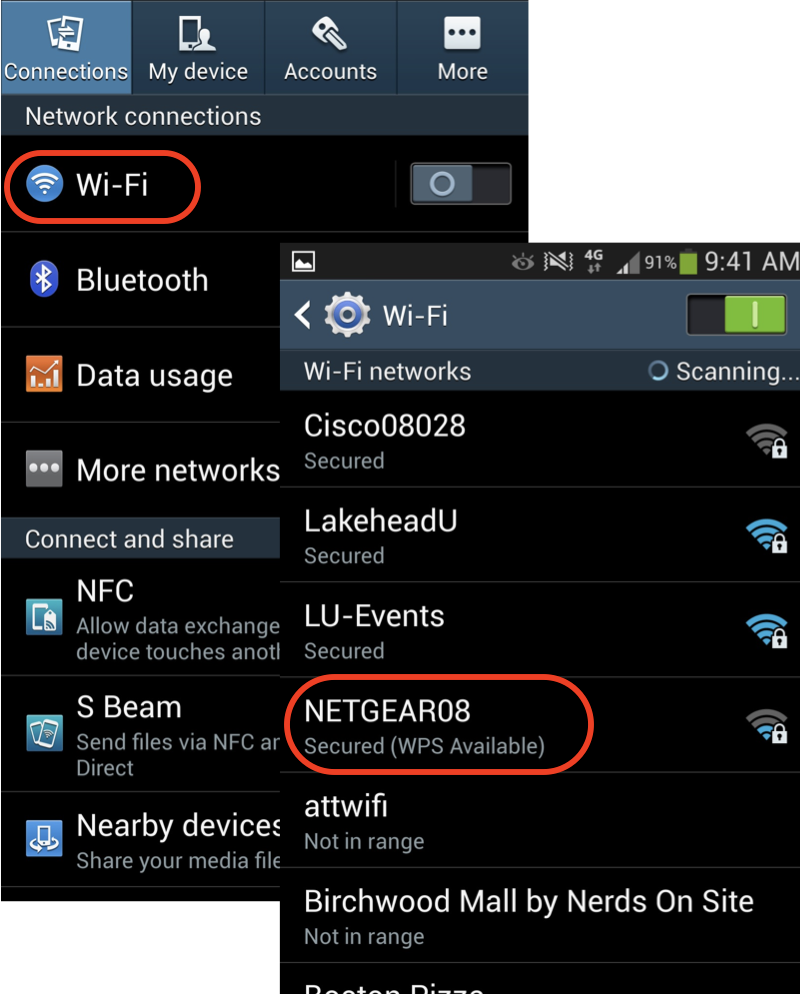
⇒ Select and Join a Wi-Fi Network
⇐ Find the Wi-Fi Network SSID and Password
2013-06-27, ∼5602🔥, 0💬
Popular Posts:
How much does the iPhone 6 / iPhone 6 Plus weigh? The new iPhone 6 and even the larger iPhone 6 Plus...
Where to find answers to frequently asked questions on Motorola Phones? I want to know more details ...
When was Apple iPhone 4S first released? How does Apple iPhone 4S look like? What are the main techn...
XLICONS.EXE 14.0 is the "Microsoft Office 2010 component" executable file included in "Microsoft Off...
What information are available on the "Settings > General > About" screen on my iPhone...