Contact Apple Support to Reset Security Questions
How to contract Apple support to reset my security questions?
✍: FYIcenter.com
 If you forgot your answers for you Apple ID security questions,
follow these steps to contact Apple support to reset your security questions:
If you forgot your answers for you Apple ID security questions,
follow these steps to contact Apple support to reset your security questions:
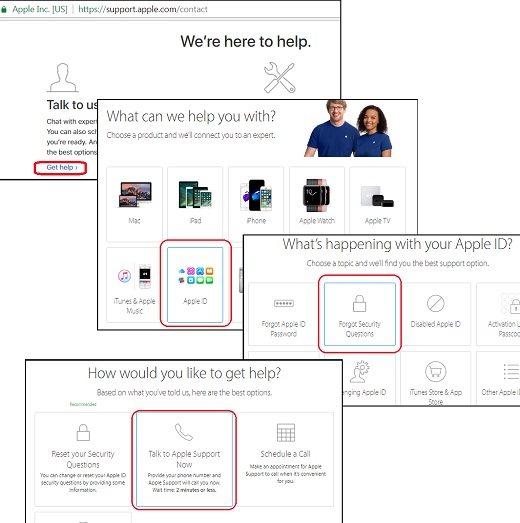
1. Go to https://support.apple.com/contact. You see the Apple support page showing up.
2. Click "Get help" link in the "Talk to us" section. You see the "Contact Apple Support" page showing up.
3. Click "Apple ID" box. You see the "What’s happening with your Apple ID?" page showing up.
4. Click "Forgot Security Questions" box. You see the "How would you like to get help?" page showing up.
5. Click "Talk to Apple Support Now" box. You see a form to submit your phone number to Apple support to call you back.
5. Click "Talk to Apple Support Now" box. You see a form to submit your phone number to Apple support to call you back.
6. An Apple advisor will call you and try to help out.
The picture below shows you steps on how to contact Apple support for help when you forgot your security question answers:
⇒ Apple Support Cannot Reset Security Questions
⇐ Frustrated when Forgot Security Question Answers
2022-02-04, ≈11🔥, 3💬
Related Topics:

💬 2023-09-10 Mara-Lynn Kontrafouris: 9670826
💬 2021-03-29 Enjoy the present moment: Thank you for your help!

💬 2022-02-04 FYIcenter.com: Try this number: 1 800-275-2273.
💬 2022-01-21 Team Ttekcol: How do I contact apple support by phone