Share Your Screen with Apple Support
Why do I need to share my screen with Apple Support? Is there security risk of doing so?
✍: FYIcenter.com
 When you call Apple support for help, support advisor
may ask you to share your screen so he or she can watch your screen.
When you call Apple support for help, support advisor
may ask you to share your screen so he or she can watch your screen.
The advisor promises you to only watch your screen, he or she will not execute any programs or take any data from your computer. So there is no risk of sharing your screen with Apple support.
Here are the steps of how you can share your screen:
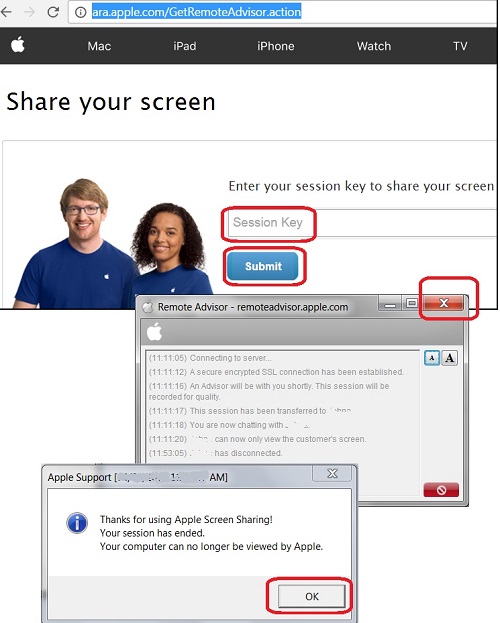
1. Run a Web browser and go to https://ara.apple.com/. You see a session key form showing up.
2. Wait for the advisor to give you a session key. Then enter the session key and click submit. You see a download file showing up.
3. Save the download file to temporary folder. Then run it. You see a term and condition screen showing up.
4. Accept the term and condition and continue. You see a chat window showing up with text messages from your advisor.
5. You also see a red arrow on your screen, indicating your screen is shared now.
Now the advisor can see your screen and can use the red arrow as a pointer to tell you where to go to trouble your problem.
When you are done with your support session, remember to close the chat window. The screen sharing program will be closed and removed from your computer automatically.
The picture below shows you an example of the Apple support screen sharing tool:
⇒ What Is Apple Two-factor Authentication
⇐ Apple Support Cannot Reset Security Questions
2023-09-10, ≈606🔥, 18💬
Related Topics:

💬 2023-09-10 Mara-Lynn Kontrafouris: 9670826
💬 2021-03-29 Enjoy the present moment: Thank you for your help!

💬 2022-02-04 FYIcenter.com: Try this number: 1 800-275-2273.
💬 2022-01-21 Team Ttekcol: How do I contact apple support by phone