Create New Pages Document on iCloud.com
How to create a new Pages document on iCloud.com? I want to use a Web browser to create a Pages document.
✍: FYIcenter.com
 You can create a new Pages document on iCloud.com
by following these steps:
You can create a new Pages document on iCloud.com
by following these steps:
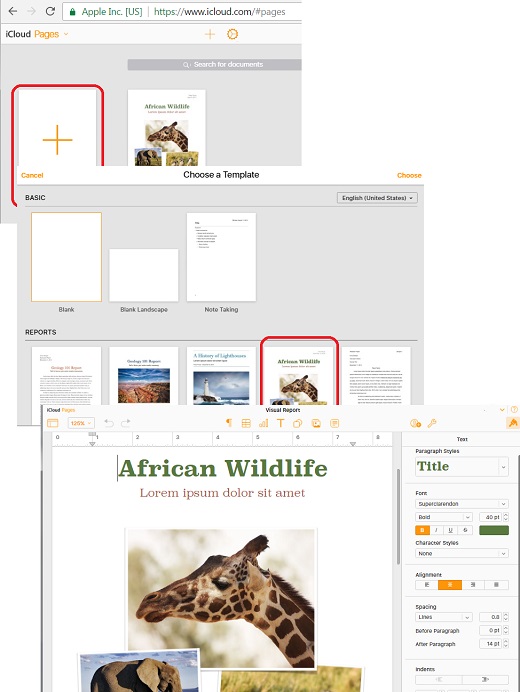
1. Login to https://www.icloud.com with a Web browser.
2. Click the "Pages" box. You see a plus sign box and a list of your existing documents.
3. Click the plus sign box. You see the template selection screen showing up.
4. Double-click on the template icon to select a template. You see your new document in edit mode.
5. Enter the content to your document. It will be saved in iCloud automatically.
The picture below shows you how to create a new Pages document on iCloud.com:
⇒ Download Pages Document from iCloud in PDF Format
2017-10-16, ∼4313🔥, 0💬
Related Topics: