Using iCloud Family Sharing on iPhone
How to use iCloud Family Sharing on my iPhone? My iPhone is connected to iCloud.
✍: FYIcenter.com
 If members of your family have different iCloud accounts,
you can setup your iCloud on your iPhone to share data
with others in your family.
If members of your family have different iCloud accounts,
you can setup your iCloud on your iPhone to share data
with others in your family.
Types of data you can share among family iCloud accounts include purchased music, movies, books and apps, or personal photos and videos.
Here are the steps to setup iCloud family sharing on your iPhone.
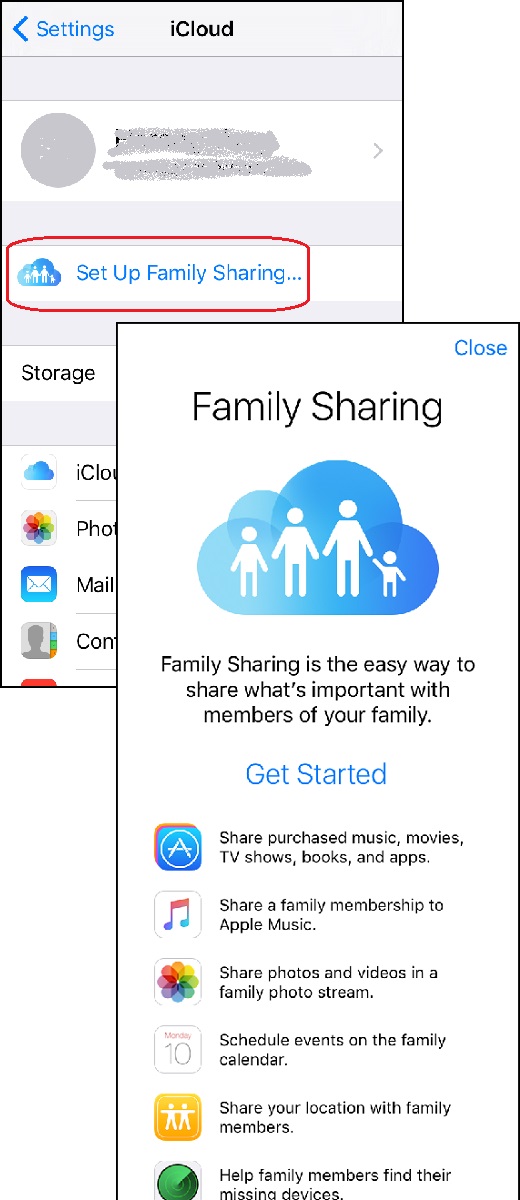
1. Go to "Settings > iCloud". You see a list of iCloud functions.
2. Tap on "Family Sharing". You see the family sharing screen:
Family Sharing is the easy way to share what's important with
members of your family.

[Get Started]

- Share purchased music, movies, TV shows, books, and apps.
- Share a family membership to Apple Music
- Share photos and videos in a family photo stream
- Schedule events on the family calendar
- Share your location with family members
- Help family members to find their missing devices
3. Tap on "Get Started" to finish the setup.
The picture below shows you iCloud Family Sharing setup screen on iPhone:
⇒ Manage iCloud Storage from iPhone
2017-07-30, ∼3601🔥, 0💬
Related Topics:
