Manage iCloud Storage from iPhone
Q
How to manage iCloud storage from my iPhone?
✍: FYIcenter.com
A
 You can manage your iCloud storage from your iPhone
by following these steps:
You can manage your iCloud storage from your iPhone
by following these steps:
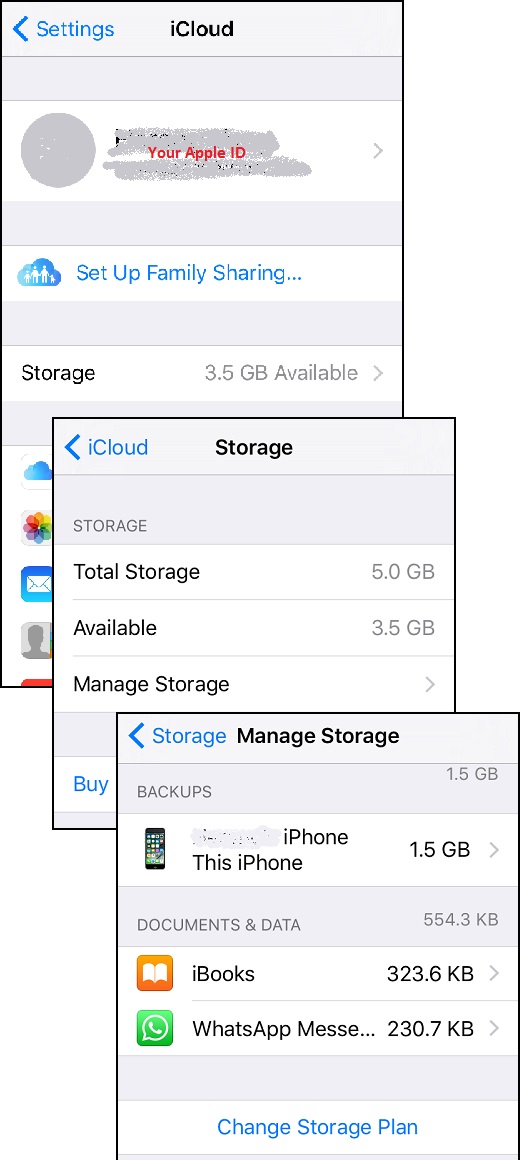
1. Go to "Settings > iCloud". You see a list of iCloud functions.
2. Tap on "Storage". You see the storage screen with your total storage size and how much left.
3. Tap on "Manage Storage". You see how much storage is used by each apps. For example:
iPhone backups  1.5 GB
iBooks          323 KB
Whatsup         230 KB
If you are running out of space, you delete the iPhone backup from iCloud and create the iPhone backup on your PC with iTunes.
The picture below shows you how to manage iCloud storage from your iPhone:
⇒ Using iCloud Drive on iPhone
2017-07-30, ∼2912🔥, 0💬
Related Topics:
