Share My Location from iPhone
How to use iCloud "Share My Location" service from iPhone? I want to my family members to know where I am.
✍: FYIcenter.com
 iCloud "Share My Location" service allows your family members
or friends to know where your current location is.
iCloud "Share My Location" service allows your family members
or friends to know where your current location is.
You easily setup "Share My Location" from your iPhone by following these steps:
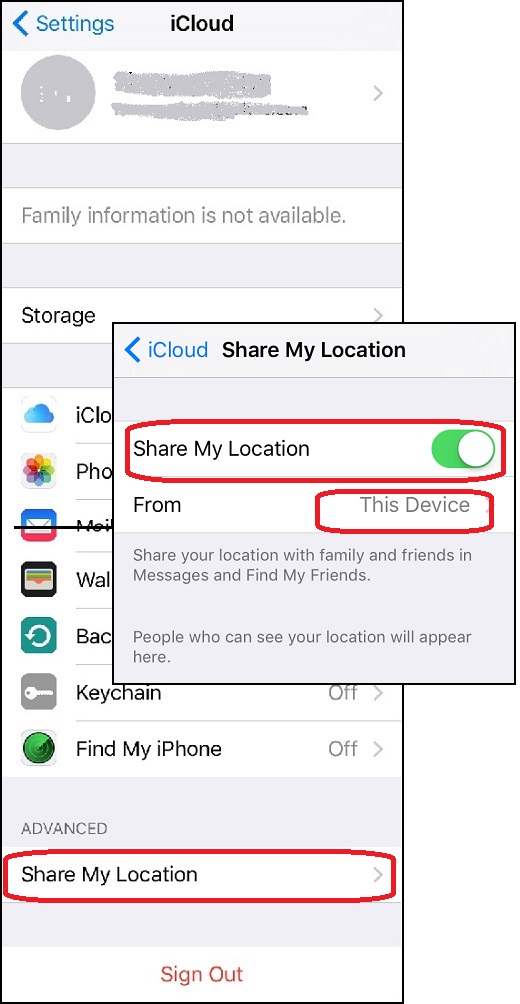
1. Go to "Settings > iCloud". You see a list of iCloud functions.
2. Scroll down and tap on "Share My Location". You see the "Share My Location" screen showing up.
3. Tap on "Share My Location" to turn it on.
4. If have multiple Apple devices connected to the same Apple ID, you tap on "From" to select which device will be used to share your current location.
Once turned on, your family members and friends can your location in Messages and Find My Friends.
The bottom of the screen also lists people who can see your location.
The picture below shows you how to share your location from your iPhone:
2017-04-16, ∼4164🔥, 0💬
Related Topics: