Where is iPhone Camera Shutter
Where is the iPhone camera shutter? I want to push it to take a photo.
✍: FYIcenter.com
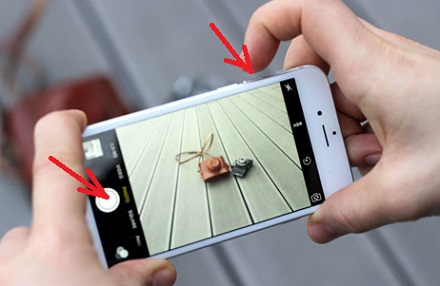
 iPhone camera has two shutters you can push to take photos
as described in the following steps:
iPhone camera has two shutters you can push to take photos
as described in the following steps:
1. Open up your iPhone camera in PHOTO mode.
2. Hold your iPhone horizontally with the start button on the left.
3. Move your iPhone with the rear camera pointing to the subject. Don't let your finger to block the camera lens.
4. The volume up button becomes the shutter when camera is running. You can use your right hand to push it to take photos.
4. There is also an on screen shutter (a solid circle icon) displayed
on the left side next the start button.
 You can user your left hand to tap it to take photos.
The picture below shows you how where are camera shutters are on your iPhone
(source: iphonephotographyschool.com):
⇒ Use iPhone Earbuds as Remote Camera Shutter
2017-10-23, ∼2487🔥, 0💬

