Manage Trusted Phone Numbers for Apple ID with Web Browser
How to manage trusted phone numbers for Apple ID with a Web browser on my computer? I want to add another trusted phone number to my Apple ID account.
✍: FYIcenter.com
 If you want to manage your trusted phone numbers in your Apple ID account
with a Web browser on your computer,
you can follow these steps:
If you want to manage your trusted phone numbers in your Apple ID account
with a Web browser on your computer,
you can follow these steps:
1. Open a Web browser on your computer and go to http://appleid.apple.com.
2. Enter your Apple ID and password. Then click the arrow to sign in.
3. Get the verification code from your current trusted device, and enter it to finish the sign in process. You see your Apple ID account information.
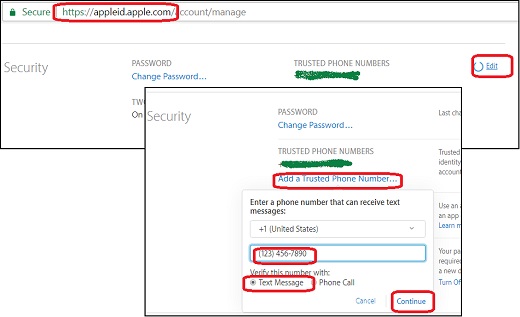
4. Go to the Security section and click Edit. You see the security section gets expanded to allow you to change password, add a trusted phone number, turn off Two-Factor Authentication.
5. Click on "Add a Trusted Phone Number" and enter the phone number.
6. Choose to verify the number with a text or phone call, and click Continue.
7. To remove a trusted phone number, click x icon next to the phone number you want to remove.
The following picture shows you steps to manage trusted phone numbers in your Apple ID account with a Web browser on your computer:
⇐ Manage Trusted Devices for Apple ID with Web Browser
2017-04-24, ∼7180🔥, 0💬

