Setup Two-Factor Authentication for Apple ID
How to setup two-factor authentication in my Apple ID account?
✍: FYIcenter.com
 If you like the extra layer of protection provided by the two-factor authentication,
you can enable it in your Apple ID account.
If you like the extra layer of protection provided by the two-factor authentication,
you can enable it in your Apple ID account.
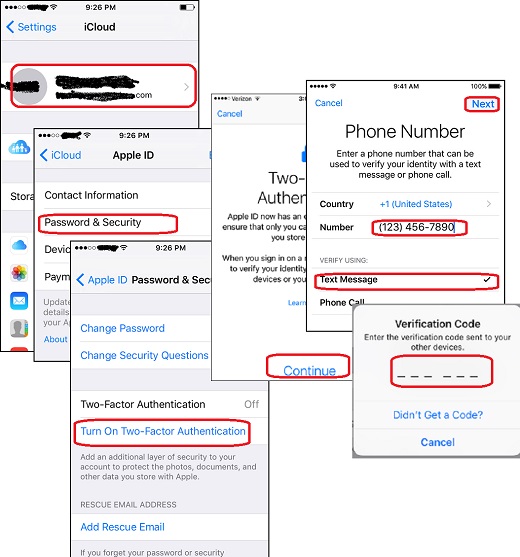
1. Tap on "Settings > iCould" on your iPhone. And sign in to your Apple ID account. You see the "iCloud" screen.
2. Tap on your Apple ID. You see the "Apple ID" screen.
3. Tap on "Password & Security". You see the "Password & Security" screen.
4. Tap on "Turn on Two-Factor Authentication". You see a warning message screen:
Two-Factor Authentication

Apple ID now has an extra layer of security
to ensure that only you can access the
information you store with Apple.

When you sign in on a new device, you will
need to verify your identity with one of your
other devices or your phone number.
5. Tap "Continue" to continue. You see the "Phone Number" screen.
6. Enter the phone number which you want to use it as a trusted phone number. And tap "Next" You see the "Verification Code" screen.
7. Go to the phone of the phone number you just entered. You see a text message from Apple that contains a 6-digit verification code.
8. Enter that verification code back to the "Verification Code" screen on your iPhone.
Your Apply ID account is now being protected by the two-factor authentication method.
Note that you have to use Apple device like an iPhone, iPad, iPod or Mac to setup two-factor authentication.
The following picture shows you steps to setup two-factor authentication in your Apple ID account:
⇒ Add More Trusted Phone Number in Apple ID
⇐ Trusted Apple Devices and Trusted Phone Numbers
2017-10-08, ∼3393🔥, 0💬

