Download and Install iCloud for Windows
How to download and install iCloud for Windows?
✍: FYIcenter.com
 If you want to use iCloud for Windows to access iCloud services from your Windows PC,
you can follow these steps:
If you want to use iCloud for Windows to access iCloud services from your Windows PC,
you can follow these steps:
1. Run a Web browser on your Windows PC, and go to Download iCloud for Windows site.
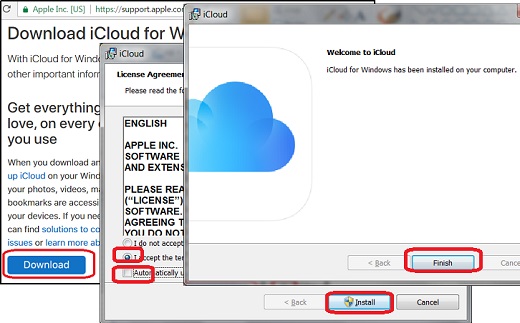
2. Click on the "Download" button in the "Download iCloud for Windows" section. You see a download prompt displayed.
3. Save the download file, iCloudSetup.exe, to a temporary folder: C:\fyicenter. iCloudSetup.exe is a large file with about 130 MB.
4. Wait for the download file to finish.
5. Double-click on C:\fyicenter\iCloudSetup.exe to run it. You see the license agreement and update options displayed.
6. Accept the license agreement and uncheck the "Automatically update iCloud for Windows and other Apple software.
7. Click "Install" button to continue installation. You see installation progress bar displayed.
8. Click "Finish" when the installation done.
9. Restart your Windows PC.
iCloud for Windows is ready to use on your Windows PC.
The picture below shows you how to download and install iCloud for Windows:
2017-08-13, ∼5696🔥, 0💬
Related Topics:

