System Tray Access to iCloud for Windows
Q
How to access iCloud for Windows from the System Tray?
✍: FYIcenter.com
A
 After you started iCloud for Windows on your Windows PC,
you will see an iCloud icon in the system tray.
After you started iCloud for Windows on your Windows PC,
you will see an iCloud icon in the system tray.
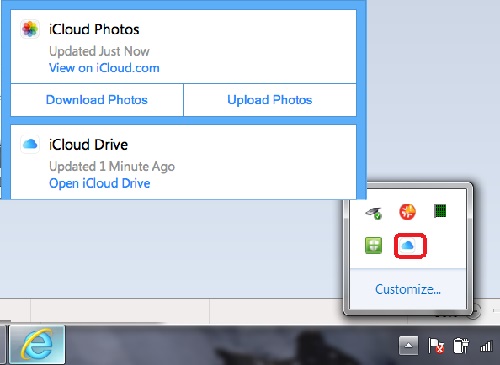
You can click the iCloud icon in the system tray to access iCloud for Windows functions:
- iCloud Photos > View on iCloud.com - Allows you to access iCloud.com account with a Web browser.
- iCloud Photos > Download Photos - Allows you to manually download photos from iCloud Photo Library to your Windows PC.
- iCloud Photos > Upload Photos - Allows you to manually upload photos to iCloud Photo Library from your Windows PC.
- iCloud Drive > Open iCloud Drive - Allows you to access files stored in iCloud Drive, which is mapped to a local file folder.
The picture below shows you how to access iCloud for Windows functions from system tray:
⇒ Change Photos Options in iCloud for Windows
2017-08-08, ∼9833🔥, 0💬
Related Topics:
