Access iCloud Photos with Windows Explorer
Q
How to access iCloud photos and videos with Windows Explorer?
✍: FYIcenter.com
A
 If you have iCloud for Windows installed and running on your Windows PC,
you can access iCloud Photo Library with Windows Explorer
as described below:
If you have iCloud for Windows installed and running on your Windows PC,
you can access iCloud Photo Library with Windows Explorer
as described below:
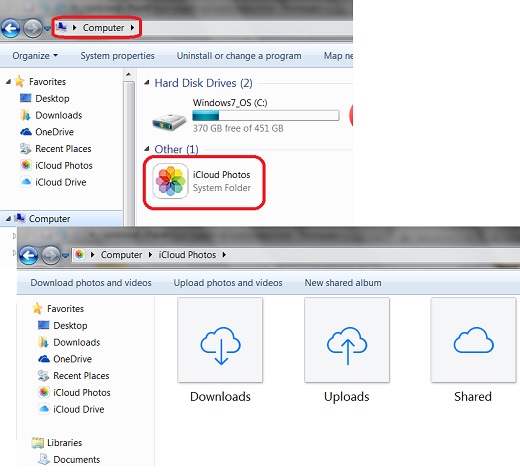
1. Open Windows Explorer.
2. Enter "Computer" in the folder address box. You see "iCloud Photos" is listed as a system folder.
3. Double-click on "iCloud Photos" to open it. You see 3 sub folders listed:
- Downloads - Where downloaded photos and videos from iCloud Photo Library are stored.
- Uploads - Where photos and videos to be uploaded to iCloud Photo Library are stored.
- Shared - Where photos and videos to be shared with others, iCloud Photo Sharing, are stored.
The picture below shows you how to change photo options in iCloud for Windows:
⇒ Upload Photos with iCloud for Windows
2017-08-08, ∼3886🔥, 0💬
Related Topics:
