Categories:
Android (32)
Apple (iPhone) (829)
Apps (26)
BlackBerry (3)
General (438)
HTC (6)
Huawei (83)
LG (43)
Motorola (50)
Nokia (4)
Palm (10)
Samsung (139)
Sony (1)
Technology (17)
Windows Phone (209)
ZTE (5)
Online Tools:
Tutorial Collections:
Other Resources:
Open and Read Books on iBooks
How to open and read books on iBooks? I have purchased some books from the book store.
✍: FYIcenter.com
You can follow this tutorial to open and read books on iBooks.
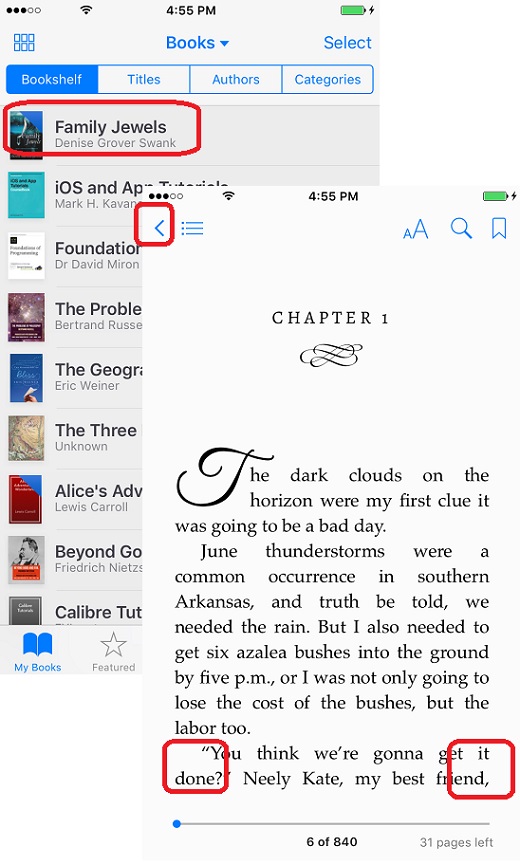
1. Launch iBooks on your iPhone. You see your book library list.
2. Tap on the book you want to open to read. You see the book opening up.
3. Tap on the right side of the screen to go to the next page.
4. Tap on the left side of the screen to go to the previous page.
5. Tap on "<" icon to quit reading.
The picture below shows you how to open and read books on iBooks:
2018-06-12, ∼2761🔥, 0💬
Popular Posts:
Where to find answers to frequently asked questions on LG Phones? I want to know more details about ...
What does IMEI stand for? And what does the IMEI number mean on my phone? IMEI stands for Internatio...
What are background services created by System UI? Can I stop them to improve performance of my Moto...
What is price of the most expensive Apple iPhone 5? The most expensive Apple iPhone 5 is the one cre...
How to change photo aspect ratio with iPhone Photos app? I want to change my photo to be a square (1...