Download EPUB Sample eBook
Where can I download an EPUB sample eBook on my iPhone?
✍: FYIcenter.com
 You can follow this tutorial to download an EPUB sample eBook.
1. Run Safari browser on your iPhone.
2. Go to http://dev.fyicenter.com/EPUB/. You see the "EPUB Tutorials" page.
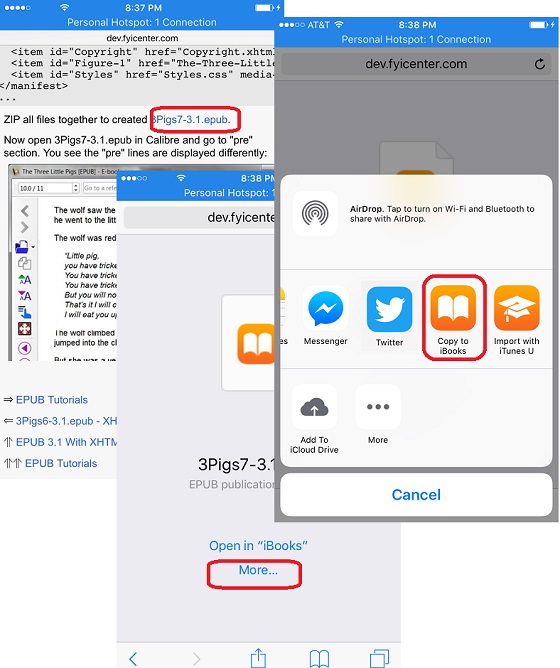
3. Scroll down and select "3Pigs7-3.1.epub - Apply CSS File". You see a link called "3Pigs7-3.1.epub" listed in the tutorial.
4. Tap on the "3Pigs7-3.1.epub" link. You see 2 options: "Open in iBooks" and "More...".
5. Tap on "More...". You see more options.
6. Swap to right and tap on "Copy to iBooks. The downloaded eBook is saved in iBooks library now.
The picture below shows you how to download and save a sample eBook to iBooks library:
2018-06-12, ∼4007🔥, 0💬
Related Topics:
